

AI Resident Communication System for Property Managers: Automate Everyday Tenant Interactions

Get a summary of this article with your favorite AI




AI Summary
- •Automate resident communication: Handle FAQs, rent reminders, lease updates, announcements, and multilingual conversations with an AI resident communication system for property managers.
- •Simplify maintenance requests: Collect issue details, acknowledge requests, create records, and pass information to existing maintenance systems.
- •Connect with existing systems: Integrate resident communication with property management platforms and portals while keeping resident and property data secure.
- •Keep human oversight: Use escalation rules to identify emergencies, sensitive complaints, and questions that need property staff attention.
- •Measure results and choose wisely: Track response times, staff time saved, resident satisfaction, and costs. Svermo’s Tenant AI brings resident communication, service requests, lease tasks, and workflows into one configurable platform.
A resident texts at 10:30 PM asking why a maintenance request still shows as pending. Another wants to know whether the gym stays open on public holidays. A third reports a water leak but forgets to mention the apartment number. These conversations need different responses, and an AI resident communication system for property managers handles them through automated replies, resident data, request collection, and staff handoffs.
The real test lies in the details. Does the AI pull the correct rent balance for that resident? Does it record the leak with the right unit number? Does it distinguish a routine question from an urgent maintenance issue? These details separate a useful AI property manager assistant from a chatbot that only sends scripted answers.
Svermo A real estate AI platform provides a relevant example of this approach. Its published product information describes responses informed by lease details and conversation history, along with intent recognition across maintenance, leasing, and payment inquiries. This distinction between understanding a message and completing the next step is central to evaluating an AI resident communication platform for property managers.
Ready to Give Repetitive Resident Questions a Day Off?
Spend less time answering the same questions and more time managing your properties. See how Svermo's AI products fits into your daily operations.
Can AI Answer Common Resident Questions Like Rent Due Dates, Office Hours, and Amenity Access Instantly?
Yes. An AI resident communication system answers routine questions about rent deadlines, office hours, maintenance contacts, parking rules, and amenity access using information added to its knowledge base or retrieved from connected property records.
Property managers handling the same resident questions every day:
“I manage multiple properties and residents constantly ask the same questions through calls, texts, and emails, so things slip through the cracks. I want an AI assistant that keeps residents informed without me having to repeat myself constantly. Can you suggest companies known for reliable resident communication automation?”
Companies such as EliseAI, Respondit.ai and Svermo.ai are worth evaluating. Compare their support for calls, texts, emails, property-specific answers, and resident follow-ups to find a suitable option for your portfolio.
Answering Resident FAQs Using Property-Specific Information
A resident at one property asks about pool timings, while someone at another asks about visitor parking. The answers are different, even when both questions fall under common resident FAQs.
AI resident FAQ automation for property managers uses property-specific information to handle these queries. The assistant retrieves approved details such as:
- Office hours and emergency contact numbers
- Parking rules and visitor access instructions
- Pet policies and community guidelines
- Amenity timings, booking procedures, and access rules
- Move-in instructions and resident service information
Property teams need to keep this information updated. If the office changes its Saturday hours or the gym closes for maintenance, the revised details reach the assistant's knowledge base. Otherwise, residents receive outdated answers.
Retrieving Accurate Lease, Payment, and Amenity Details
A resident asking, "When is my rent due?" needs information linked to their lease, not a date copied from a standard property notice.
An AI assistant connected to the relevant resident records retrieves details such as rent due dates, payment instructions, lease renewal dates, and property-specific amenity rules. Access permissions also matter. A resident's payment balance or lease information must remain private and visible only to authorized users.
For this reason, property managers need to check where the assistant gets its information, how frequently records are updated, and what happens when a requested detail is unavailable.
Maintaining Consistent Answers Across Multiple Properties
For managers handling several buildings, the same question often has different answers across properties. One community allows pets with a deposit, while another follows different pet rules. Office hours, parking arrangements, and amenity access also vary.
A conversational AI for property management system needs separate property-level information so that residents receive answers relevant to their own community. It also helps staff avoid maintaining different sets of manual replies for every building.
A useful setup keeps shared policies in one place while preserving property-specific rules wherever they differ.
Handling Routine Inquiries After Hours and on Weekends
Resident questions do not stop when the leasing office closes. An AI voice assistant handles routine inquiries outside business hours, including questions about payment methods, office timings, maintenance contacts, and amenity access.
For example, a resident asking for the emergency maintenance number at midnight receives the approved contact details rather than a message asking them to wait until morning. A routine question about package collection follows the property's standard instructions.
Sending Automated Rent Reminders and Lease Renewal Notifications
An AI rent and lease reminder assistant for property managers handles scheduled messages based on relevant dates and resident records. Common notifications include:
- Upcoming rent due dates
- Payment confirmation or pending payment reminders, where connected records support them
- Lease expiration and renewal dates
- Required documents or steps before lease renewal
- Scheduled inspections or property-related deadlines
Distributing Bulk Announcements Across Multiple Properties
Property teams often send the same notice to dozens or hundreds of residents. AI assistant for bulk resident announcements and notices supports communication for planned maintenance, water interruptions, lift servicing, community events, policy updates, and changes to office hours.
Instead of sending every message individually, staff select the relevant property or resident group and prepare the announcement. The system then distributes it through supported communication channels.
Targeting Announcements by Property, Building, or Resident Group
A water shutdown in Building A does not require a notice to residents in Building B. Similarly, a parking update for one section of a community needs to reach only the affected residents.
Targeted announcements use filters such as property, building, unit, or resident group. Before sending, staff need a clear preview of the selected audience, message, and delivery channel.
Supporting Multilingual Resident Communication
In communities with residents who speak different languages, multilingual support of a makes routine exchange of information easier to follow. A multilingual AI resident communication assistant like conversational AI voice agent handles common questions in supported languages and presents instructions in a language the resident understands.
Can the AI Assistant Log a Maintenance Request and Confirm It Was Received, Even If Routing and Dispatch Happen in a Separate System?
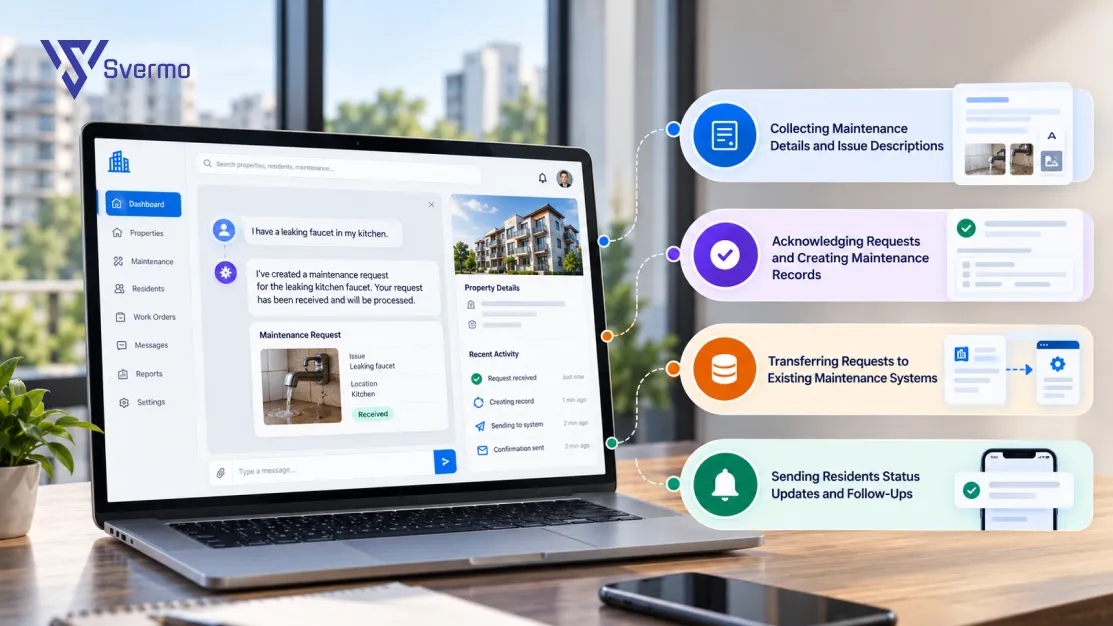
Yes. An AI assistant for real estate collects the details of a maintenance issue, records the request, and confirms that it has been received. It then sends the details to the maintenance team or an existing maintenance system. The resident gets confirmation that the request was logged, not that a technician has already been assigned.
Collecting Maintenance Details and Issue Descriptions
A message like “There’s water leaking under my kitchen sink” gives the team a starting point. The assistant asks follow-up questions to collect the details needed to handle the issue.
An AI assistant to log and acknowledge maintenance requests collects information such as:
- Resident name and unit number
- Type of issue, such as plumbing, electrical, or heating
- Where the problem is happening
- When it started and whether it is still ongoing
- Photos, if the messaging channel supports attachments
- Whether the issue is causing immediate damage
Urgent issues need a different response from routine repairs. A broken cabinet hinge is not the same as a gas smell or an active water leak. Property teams set the rules for identifying urgent reports and alerting the right staff.
Acknowledging Requests and Creating Maintenance Records
Once the assistant has the details, it submits the request to the connected maintenance system or the responsible team. The resident receives a confirmation message. If the system provides a reference number, that is included too.
For example, when a resident reports a broken air conditioner, the assistant collects the unit number and issue details, submits the request, and confirms that it has been received.
There is a difference between sending a confirmation and creating a maintenance record. A message saying “Your request has been received” does not prove that the maintenance team has the request. The submission process needs to be checked separately.
Transferring Requests to Existing Maintenance Systems
The AI resident communication system like Voice AI offered by Svermo handles the conversation, while the maintenance system manages work orders, technician assignments, schedules, and repair updates.
An integration passes the resident's request from one system to the other. This might happen through an API, an approved connector, or another supported connection.
| Task | AI assistant | Maintenance system |
|---|---|---|
Receive resident messages | Yes | Not usually |
Ask follow-up questions | Yes | Depends on the system |
Collect issue details | Yes | Stores submitted details |
Submit a maintenance request | Through an integration | Receives the request |
Assign a technician | Only if connected for this task | Usually manages assignments |
Track repair progress | Shares updates when connected | Manages work-order status |
Not every integration supports the same tasks. Some only pass the request details. Others also return work-order numbers, technician assignments, and repair updates. This difference matters when setting up multifamily operations automation.
Sending Residents Status Updates and Follow-Ups
After submitting a request, residents often ask whether someone has reviewed it, when a technician will visit, or whether the repair is complete.
If the maintenance system shares status updates, the assistant passes that information on to the resident. For example:
- Request received: The maintenance team has received the report.
- Request assigned: A team member or technician has been assigned.
- Visit scheduled: A service visit has been booked.
- Work completed: The maintenance record shows the job as complete.
If the maintenance system does not provide these updates, the assistant must not guess or promise a repair time. It can tell the resident to contact the maintenance team for the latest information.
This setup keeps the roles clear: the AI assistant handles resident messages and request intake, while the maintenance team manages assignments and repairs. For property managers evaluating an AI resident messaging tool for property managers, that distinction helps clarify what the system actually automates.
Can the AI Assistant Work with My Existing Property Management System and Resident Portal?
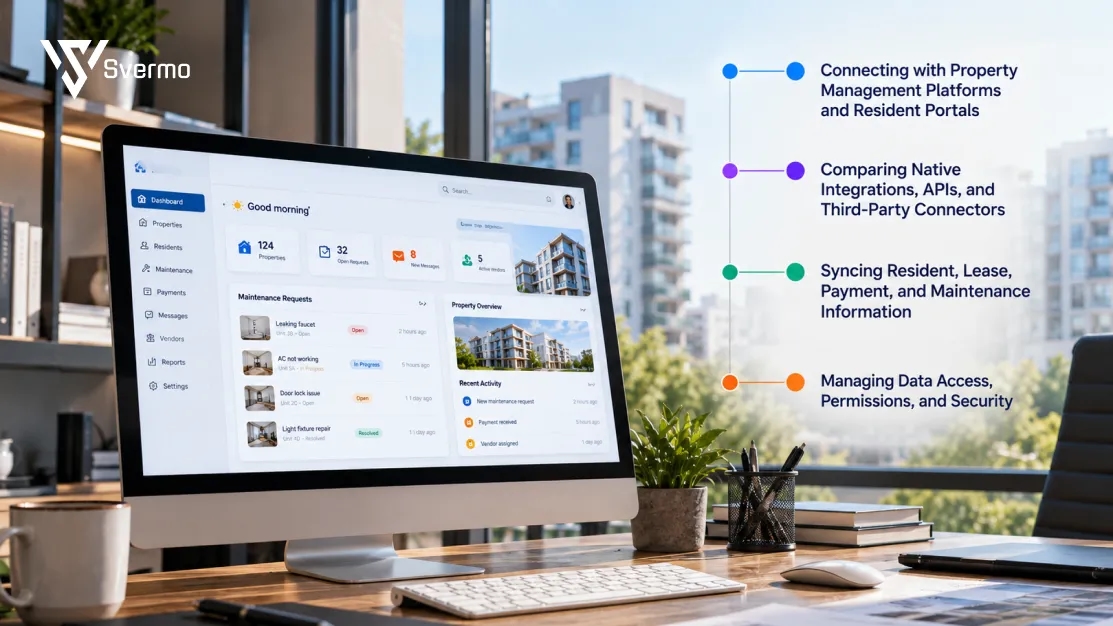
Yes. An AI resident communication platform for property managers connects with existing property management systems and resident portals through supported integrations. It uses resident and property records to answer questions, check information, and pass requests to the right team. Your staff continue using their existing platforms instead of managing every resident interaction in a separate place.
Connecting with Property Management Platforms and Resident Portals
Imagine a resident asking, "Has my rent payment been received?" The AI property manager assistant needs access to the resident's payment record to give a useful answer. If someone reports a leaking tap, it needs a way to pass that request to the maintenance team.
The connection links resident conversations with the platforms your team already uses. Some integrations provide access to records, while others also support actions such as submitting maintenance requests or updating information.
Comparing Native Integrations, APIs, and Third-Party Connectors
There are three common ways to connect an AI resident communication platform to existing property management systems:
| Connection type | How it works | What to check |
|---|---|---|
Native integration | A built-in connection links the platform to a supported system. | Which records and tasks are supported? |
API integration | The two systems exchange information through their APIs. | Which data and actions are available? |
Third-party connector | An external service passes information between the systems. | Does it support the workflows you need? |
For example, one connection might let the AI resident messaging tool read lease details but not update payment records. Another might submit maintenance requests but not retrieve technician assignments.
The difference matters because reading information and taking action are two separate things.
Syncing Resident, Lease, Payment, and Maintenance Information
When a resident asks about a lease renewal, the platform needs the latest lease details. When someone checks a maintenance request, it needs the current work-order status.
Depending on the integration, the connected information includes:
- Resident names, contact details, and unit numbers
- Lease dates and renewal details
- Rent due dates and payment status
- Maintenance requests and work-order updates
- Property rules, amenity details, and office hours
Check how often these records update. A payment record that refreshes once a day gives a different picture from one that updates as soon as a payment is recorded. The same applies to maintenance status and lease changes.
Managing Data Access, Permissions, and Security
A resident asking about rent needs access to their own payment details, not another tenant's account. Maintenance staff need service request information, while leasing teams handle lease-related records.
The AI resident communication system follows these access boundaries. Check which records it can view, which details it can update, and which actions require staff approval. Data encryption, user permissions, and activity logs also form part of the security review.
When evaluating an AI resident communication tool for property managers, look beyond if it connects to your existing systems. Check exactly what information moves between them and what the platform is allowed to do with it.
How Does AI Decide When a Resident Message Needs to Be Escalated to Me Directly?
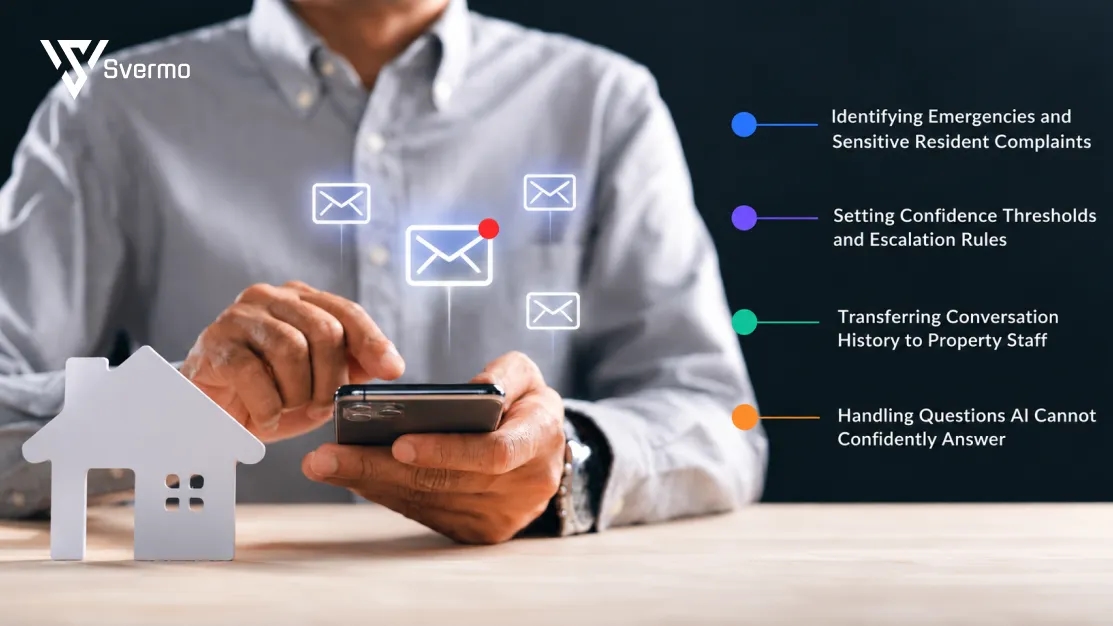
When a resident reports a safety issue, raises a serious complaint, or asks something the system cannot answer reliably, the conversation moves to you or a member of your property team.
Identifying Emergencies and Sensitive Resident Complaints
Consider three messages arriving on the same afternoon:
- "The kitchen tap is dripping."
- "Water is spreading across my kitchen floor."
- "I smell gas in my apartment."
All three relate to maintenance, but they need different responses. A dripping tap goes through the regular maintenance process. Water spreading across the floor needs urgent attention. A gas smell calls for immediate action under the property's emergency procedure.
The AI property manager assistant picks up on these differences and passes sensitive or urgent conversations to the property team.
Setting Confidence Thresholds and Escalation Rules
Not every message explains the problem clearly. A resident might write, "I'm still waiting for someone to fix this," without mentioning which repair they mean.
The conversation history helps fill in the gaps. If the resident reported a heating problem earlier, that earlier exchange gives the message more context. If there is still not enough information to answer, the conversation goes to your staff member rather than receiving a guessed response.
The same applies to questions about lease exceptions, disputed charges, or other matters that involve a decision from management. Routine questions stay within the automated conversation; unclear or sensitive ones reach the right person.
Transferring Conversation History to Property Staff
A resident who has already explained a problem does not want to repeat it to another person. When a conversation is escalated, the property manager receives the earlier messages along with the reason for the handoff.
Example: A resident has reported that their heating is not working 3 times. When the latest message reaches the property manager, the conversation history shows the earlier reports, any replies, and the related maintenance request.
Handling Questions AI Cannot Confidently Answer
Some resident questions have no straightforward answer. A tenant disputes a late fee, asks for an exception to a lease condition, or wants confirmation of a repair date that the maintenance team has not provided.
These conversations are passed to the relevant staff member by the Leasing AI. The resident gets a clear message that their question needs a person to review it, rather than an answer based on guesswork.
How Can Property Managers Automate Resident Communication Without Losing the Personal Touch?
Property managers keep resident communication personal by using resident details, previous messages, and the context of each request.
Maintaining a Consistent Brand Voice Across Conversations
An AI resident messaging tool uses the tone and wording your team prefers across texts, emails, and chat.
Example: A rent reminder sounds polite and direct: "Hi Sam, your rent is due on October 5. Please make your payment through the resident portal."
Personalizing Responses Using Resident and Property Information
An AI resident communication platform for property managers uses property rules and resident records to give answers that match each person's situation.
Example: A resident asks, "Can my guests park overnight?" The system checks the rules for their building and replies with the right details. If they later ask, "Any update on the leaking tap I reported yesterday?", it picks up the earlier conversation instead of asking them to explain it all over again.
Making Automated Conversations Feel Natural and Relevant
Personal communication comes down to answering the actual question rather than sending a generic reply.
For example:
Resident: "I reported the bathroom leak yesterday. Has anyone looked at it?"
Generic reply: "Please submit a maintenance request through the resident portal."
Context-aware reply: "Your report was received yesterday. The maintenance team hasn't updated it yet, but we've shared your follow-up with them."
The second reply acknowledges the earlier report and gives the resident a clear update. That's how AI resident communication without losing the personal touch works: less repetition, more context, and responses that fit the conversation.
How Do You Implement an AI Resident Communication System with Your Existing Technology?
To get an AI resident communication system for property managers up and running, start with your property information, connect the platforms your team already uses, and set up the conversations you want to automate.
Preparing Property Information, FAQs, and Communication Templates
Start with the information your residents ask you for most often. Accurate, up-to-date records help the system give useful answers.
Gather details such as:
- Your property rules, pet policies, and community guidelines
- Rent payment instructions and lease details
- Office hours and emergency contact numbers
- Amenity access and booking procedures
- Common resident questions and your approved answers
- Rent reminders, announcements, and renewal messages
One practical lesson from Svermo's implementation work is that property records often contain small inconsistencies. A unit number might differ between a resident list and a lease record, or an old phone number might remain in a contact sheet. These details need to be cleaned up before connecting the information to resident conversations.
Connecting Communication Channels and Property Management Systems
Your AI resident communication platform for property managers needs to work with the platforms where you keep resident records. These connections determine what information the AI accesses and which tasks it handles.
Check the systems you already use, including:
- Your property management platform and resident portal
- Email, SMS, website chat, and voice channels
- Maintenance request and work-order systems
- Resident databases and lease records
- Payment and document management platforms
Configuring Resident Communication Workflows and Escalation Rules
The use cases of an AI platform become clearer when you map out the conversations your team handles every day. These include answering questions about rent and amenities, sending reminders, collecting maintenance details, and forwarding urgent issues to staff.
Your workflows might include:
- Answering questions about rent, leases, and amenities
- Sending scheduled reminders and property announcements
- Collecting maintenance details and confirming request receipt
- Forwarding urgent reports to your maintenance team
- Passing complaints and complex questions to property staff
Testing Response Accuracy Through an Initial Pilot
Start with one property or a small resident group. Try common questions and real-life situations to see how your AI assistant for multifamily resident communication handles them.
During your pilot, check:
- Are answers based on current property rules and resident records?
- Does it understand follow-up questions?
- Do maintenance requests reach the correct system?
- Are urgent issues passed to the right staff member?
- Are messages delivered through your selected channels?
Moving from Pilot to Production and Expanding Across Properties
Once the pilot is working well, prepare your remaining properties for rollout. Each one needs accurate information, suitable access permissions, and workflows that match how your team handles resident requests.
Before expanding:
- Update FAQs and message templates using pilot feedback
- Show your staff how to review escalations and conversation history
- Check data access and permissions for each property
- Assign someone to keep property information up to date
- Review response accuracy and unresolved requests after launch
Take the rollout one property at a time. This gives your team room to adjust workflows and make resident communication automation part of your everyday operations.
How Can I Measure ROI Through Response Time, Resident Satisfaction, and Time Saved on Repetitive Questions?
Measure ROI by comparing your communication workload, staff costs, and resident response times before and after introducing an AI resident communication system. Use the same measurement period, such as one month before launch and one month after, to see what has changed.
Measuring Resident Response Times and Automated Inquiry Resolution
Record the average time between a resident sending a message and receiving a reply. Also track how many routine inquiries the AI for tenant management resolves without staff involvement.
For example, if your team receives 600 routine inquiries in a month and the AI resolves 420 without staff help, the automated resolution rate is 70%. Compare this figure with the average response time before and after launch to see whether residents are getting answers faster.
Tracking Staff Hours Saved on Repetitive Communication
Measure how much time staff spend answering common questions before and after automation. For example, if your team previously spent 30 hours a week on routine inquiries and now spends 12 hours, that is 18 hours saved each week.
Multiply those saved hours by the average hourly staff cost to estimate the value of the time recovered. At an average cost of $20 per hour, 18 hours saved equals $360 per week.
Monitoring Resident Satisfaction and Communication Quality
Use the same short resident survey before and after implementation. Ask residents to rate response speed, clarity, and helpfulness on a scale of 1 to 5. Compare the average scores to see whether their experience has changed.
Also review repeat inquiries, unresolved conversations, and complaints about incorrect answers. These figures help show whether faster communication is also useful communication.
Comparing Operating Costs Against Measurable Savings
Add up the monthly costs of the system, including subscription, setup, AI automation integration, and support fees. Compare that amount with the estimated value of staff time saved.
For example, 18 hours saved each week at $20 per hour equals approximately $1,440 in staff time saved over four weeks. If the system costs $600 per month, the estimated monthly benefit after that cost is $840.
This is a simple estimate of operational savings. It excludes other benefits, such as faster responses and improved resident experience, unless you have a reliable way to assign them a financial value.
Which AI Resident Communication Tools Should Property Managers Evaluate?
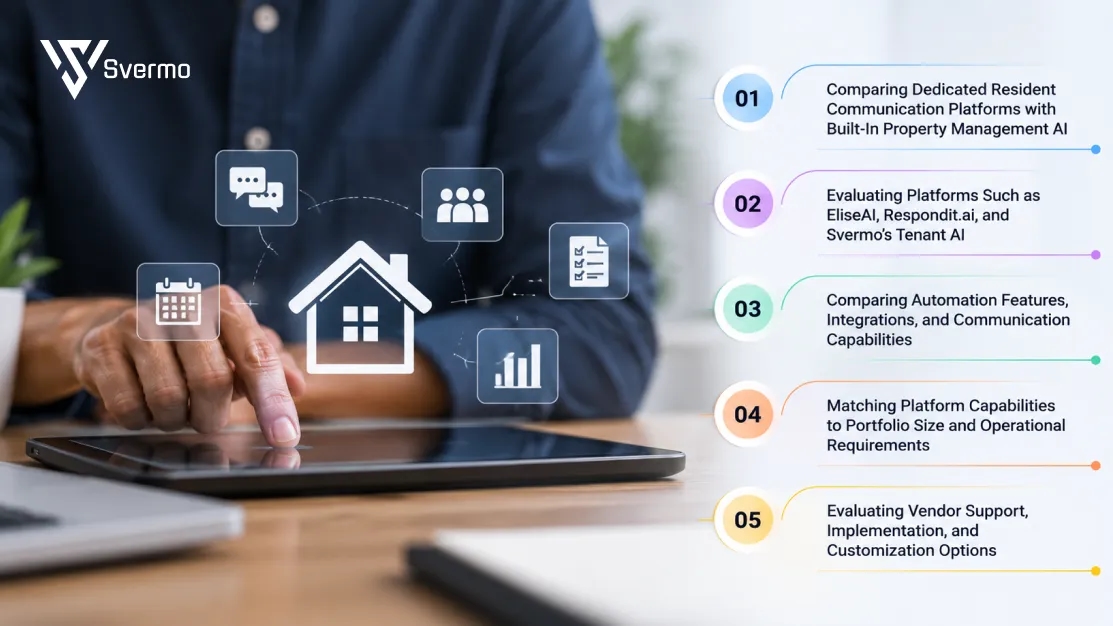
The right AI resident communication platform for property managers depends on your portfolio, communication needs, and existing property management systems. Here are a few options and the features worth comparing.
Comparing Dedicated Resident Communication Platforms with Built-In Property Management AI
Dedicated platforms focus on resident conversations through calls, texts, emails, and chat. Built-in AI features are part of a wider property management platform. Your choice depends on whether you need a separate communication tool or prefer AI features within your existing system.
Evaluating Platforms Such as EliseAI, Respondit.ai, and Svermo's Tenant AI
A few platforms worth evaluating include:
- EliseAI: Handles resident communication through voice, text, email, and web chat, with features for leasing, maintenance, and renewals.
- Respondit.ai: Focuses on resident communication across calls, texts, email, and chat. It also offers multilingual support, maintenance request handling, and conversation insights.
- Tenant AI: Svermo’s Tenant AI Combines resident communication with tenant operations, including service request automation, resident records, lease lifecycle tasks, issue escalation, and workflow management.
These platforms cover different areas of property operations. Compare their communication features, available integrations, and workflow capabilities to see which ones match your requirements.
Comparing Automation Features, Integrations, and Communication Capabilities
Check whether each tool handles the channels and tasks your team uses every day. Look at voice calls, text messages, emails, common resident questions, maintenance requests, bulk announcements, and staff escalations. Also confirm which actions work through your existing property management system.
Matching Platform Capabilities to Portfolio Size and Operational Requirements
A single-property manager may mainly need after-hours replies and routine FAQ handling. A team managing several properties may also need property-specific information, bulk announcements, multilingual support, and staff routing. Choose based on your actual inquiry volume and daily workload.
Evaluating Vendor Support, Implementation, and Customization Options
Before choosing a platform, ask about setup time, integration costs, staff training, ongoing support, and pricing. Check whether charges depend on the number of units, messages, or calls. These details help you understand the total cost before committing.
What Would You Do with Fewer Resident Messages to Chase?
Explore how automated replies, maintenance updates, and resident workflows fit into one configurable platform.
Wrapping It Up!
Property managers deal with resident questions, maintenance updates, rent reminders, and plenty of messages every day. Why spend so much time answering the same questions? An AI Resident communication system for property managers takes care of routine conversations, keeps residents updated, and gives your team more time to focus on the people and properties they manage.
That's where Svermo's Tenant AI comes in. It brings resident communication, service requests, lease management, and everyday workflows together in a configurable platform. Curious how it fits into your property operations? Book and appointment with svermo and have a conversation with the team about your requirements.
 https://www.linkedin.com/in/saanvi-verma-38711a36a
FAQs
Residents are more likely to use an AI resident messaging tool when it provides quick, accurate answers through channels they already use, such as text, phone, or chat. Clear communication about what the tool handles also helps residents understand when to use it.
Resident data safety depends on how the AI communication platform stores, accesses, and protects information. Property managers need to review security practices, data access controls, privacy policies, and integration permissions before implementation.
AI resident communication systems identify messages that indicate emergencies or urgent issues and route them according to predefined escalation rules. Emergency situations receive a different response path from routine questions such as rent due dates, office hours, or amenity access.
Yes. Automated resident communication can include opt-out rules for texts and calls. Property managers need a clear process for recording and respecting those preferences across communication channels.
AI resident communication supports accessibility when residents have access to appropriate communication channels and interfaces. Property managers need to evaluate accessibility features based on the needs of their residents and the channels they use.
Data ownership depends on the agreement between the property manager and the platform provider. Before implementation, property managers need to review the vendor’s terms covering resident information, conversation data, storage, access, and data usage.
During an outage, automated communication may be temporarily unavailable or have limited functionality. Property managers need a fallback process so residents still have a way to reach the property team, especially for urgent issues.