
AI Work Order Management Platform for Maintenance Operations Managers: Automate Work Order Prioritization, Scheduling & Routing

Get a summary of this article with your favorite AI





AI Summary
- •Request intake: AI converts maintenance requests into actionable work orders, flagging duplicates and missing details.
- •Prioritization and assignment: AI work order prioritization for maintenance teams ranks jobs and supports technician and vendor matching.
- •Scheduling and fieldwork: AI work order scheduling for maintenance teams coordinates visits while technicians document repairs and completion.
- •Preventive maintenance and measurement: AI preventive maintenance scheduling for property teams tracks recurring tasks and helps measure operational performance.
- •Connected operations: Svermo views maintenance as part of wider property workflows, connecting repairs with resident communication and administrative tasks.
What happens when three urgent repair requests arrive at once, two technicians are already booked, and a resident is waiting for an appointment update? For maintenance operations managers, these situations quickly turn into a juggling act of priorities, assignments, and schedule changes.
An AI work order management platform brings request intake, urgency ranking, technician and vendor assignment, and visit scheduling into one workflow. The key questions are how it handles competing priorities, incomplete requests, and last-minute disruptions, and whether managers retain control over critical decisions.
The scale is significant: Buildium’s 2026 Renters’ Survey found that 39% of renters want better maintenance follow-through, and 84% expect a response from their property manager within 24 hours.
As a U.S.-based AI product company focused on real estate operations, Svermo approaches automation around practical property-management workflows. Its AI property management platform connects maintenance coordination with resident communication and broader operational tasks. That perspective matters because faster work order processing depends on how well these steps work together, not simply on how quickly a ticket is created.
Still chasing work orders instead of closing them?
Find the bottlenecks slowing your maintenance team down and explore where AI fits.
How Does AI Convert Maintenance Requests into Actionable Work Orders?

An AI work order management platform converts maintenance requests into work orders with the reported problem, unit details, access needs, and supporting photos. It also flags duplicate reports and missing information that could delay dispatch.
Capturing Requests from Calls, Texts, Emails, and Portals
AI maintenance request automation collects requests from connected channels and extracts details such as the reported fault, unit number, and preferred appointment time.
For example, a resident texts, “The kitchen sink has been leaking since last night.” The system records the leak, links the request to the unit using available property records, and attaches the original message. The coordinator reviews the details before dispatch. Available channels depend on the platform’s integrations.
Detecting Duplicates and Combining Them into One Work Order
AI compares property details, issue descriptions, locations, and submission times to flag possible duplicates.
If residents in Units 204 and 304 both report ceiling leaks, the coordinator checks whether the reports point to one plumbing incident. Related jobs are linked, while each unit’s access arrangements and repair tasks remain visible. This prevents duplicate entries from distorting maintenance backlog management.
Collecting Repair Details, Property Information, and Access Needs
AI gathers available property records, repair history, access instructions, and photos to give technicians useful job details before arrival.
For example, “The AC runs, but the bedroom stays hot” identifies a cooling complaint, not a confirmed equipment fault. The coordinator checks previous repair notes and arranges an inspection. If the unit number or entry instructions are missing, those gaps are flagged before routine dispatch.
Capturing a maintenance request accurately starts with understanding what the resident reports and routing that information to the right team. Svermo’s work on its Voice AI Agent for property management includes voice-based maintenance request capture and routing, reflecting the role that structured intake plays in property operations.
Flagging Incomplete Requests for Clarification
AI identifies missing details that affect dispatch and flags the specific information required.
A request stating “The heater isn’t working” needs the affected room or unit confirmed if those details are missing. The coordinator requests clarification before routine dispatch. If the resident also reports a burning smell, the request follows the property’s urgent safety escalation procedure rather than waiting in the normal queue.
How Does AI Prioritize an Open Maintenance Backlog?
AI work order management ranks open jobs by urgency, service deadlines, time outstanding, and the consequences of delay. The ranking needs to reflect the property’s actual workload and service rules.
Maintenance operations managers often ask queries like this:
“My maintenance team has dozens of open work orders at any time, and every morning I reorder the list by hand based on age, urgency, and who promised what to whom. Can AI keep that queue in the right order as new work orders come in?”
AI can reassess open work orders as new requests, status changes, and urgency signals come in. Configured priority rules keep urgent and overdue jobs visible as the backlog changes.
Ranking Work Orders by Urgency, Age, and Deadlines
A maintenance backlog has 30 open jobs and four technicians available today. Three requests compete for the next available slot:
| Open work order | Priority consideration | Decision |
|---|---|---|
Active leak beneath a kitchen sink | Ongoing water damage | Urgent assessment |
Refrigerator repair with a service deadline today | Deadline and resident impact | Review against the service commitment |
Five-day-old cabinet repair | Time outstanding, low immediate impact | Keep in the queue and track its age |
These rules keep maintenance backlog management focused on urgency and service commitments. The oldest request does not automatically come first, and a new request does not automatically displace every existing job.
Weighing Safety Risks and Operational Impact
The consequences of a fault matter as much as the type of repair.
- Property damage: Water spreading through a ceiling needs urgent attention because the damage is ongoing.
- Resident safety: A reported burning smell requires escalation under the property's safety procedure.
- Building-wide disruption: A failed main entrance lock affects multiple residents and raises a security concern.
- Routine repair: A loose cupboard handle generally stays in the normal queue unless other circumstances change its severity.
AI flags reported risks against the property's escalation rules. Staff verify the situation and follow emergency procedures; an automated ranking does not replace a safety assessment.
Reassessing Priorities When Urgent Requests Arrive
When an emergency enters an already-booked day, the decision extends beyond moving one work order to the top of the list.
- Check technician availability and skills for the urgent job.
- Identify displaced appointments that need reassignment or rescheduling.
- Recalculate priorities using current urgency, deadlines, and service commitments.
- Update affected residents about appointment changes and record the reason for the delay.
This connects AI work order prioritization for maintenance teams with the wider maintenance operations workflow, including technician availability and disrupted appointments.
Explaining Priorities and Allowing Manager Overrides
Every high-priority recommendation needs a traceable reason, such as an active leak, an approaching deadline, an overdue service target, or a reported safety concern.
Managers need override controls when the original report lacks context or the situation changes. If a routine leak report later reveals water near an electrical outlet, the coordinator escalates it and records the reason for the change. These records support work order lifecycle management and reveal where property priority rules need adjustment.
Prioritization also depends on how well a system interprets incoming requests and directs them through the right workflow. Tenant AI agent offered by Svermo addresses related property operations through request understanding, intelligent escalation, and task prioritization.
How Does AI Match Work Orders to the Right Technician or Vendor?
AI matches work orders to technicians and vendors based on trade skills, availability, workload, and job requirements. Accurate matching reduces unnecessary handoffs and repeat visits.
Matching Jobs to Technician Skills and Trade Expertise
A general maintenance technician is not automatically qualified for every repair. AI compares the reported fault with technician skills, certifications, and trade experience.
A circuit breaker fault requires a qualified electrician, while a leaking faucet typically requires a plumber. Clear work order details and accurate skill records drive better assignments.
Checking Technician Availability and Workload
AI checks existing assignments, available hours, and workload before recommending a technician. A qualified technician with a full schedule is a different choice from one with capacity for another job.
Coordinators review existing commitments alongside the recommendation to avoid overlapping appointments and unmanageable workloads.
Choosing Between In-House Technicians and Outside Vendors
The choice depends on internal trade coverage, job complexity, staff capacity, and approved vendor arrangements. In-house teams often handle routine repairs, while specialist vendors take jobs requiring specific credentials or equipment.
For single-family rental portfolios, property locations also affect assignment decisions. An AI single-family rental operations platform supports maintenance coordination across dispersed homes, including the assignment of internal teams and local vendors.
Using Repair History and Parts Needs to Guide Assignments
Previous repair records provide context for repeat faults. A technician familiar with an HVAC unit’s service history has relevant experience when the same problem returns.
Specialist repairs also require the right technical expertise. Coordinators use the reported fault, previous work, and repair requirements to confirm assignment suitability. Parts readiness and appointment timing belong in the scheduling process.
How Does AI Schedule and Route Maintenance Visits?
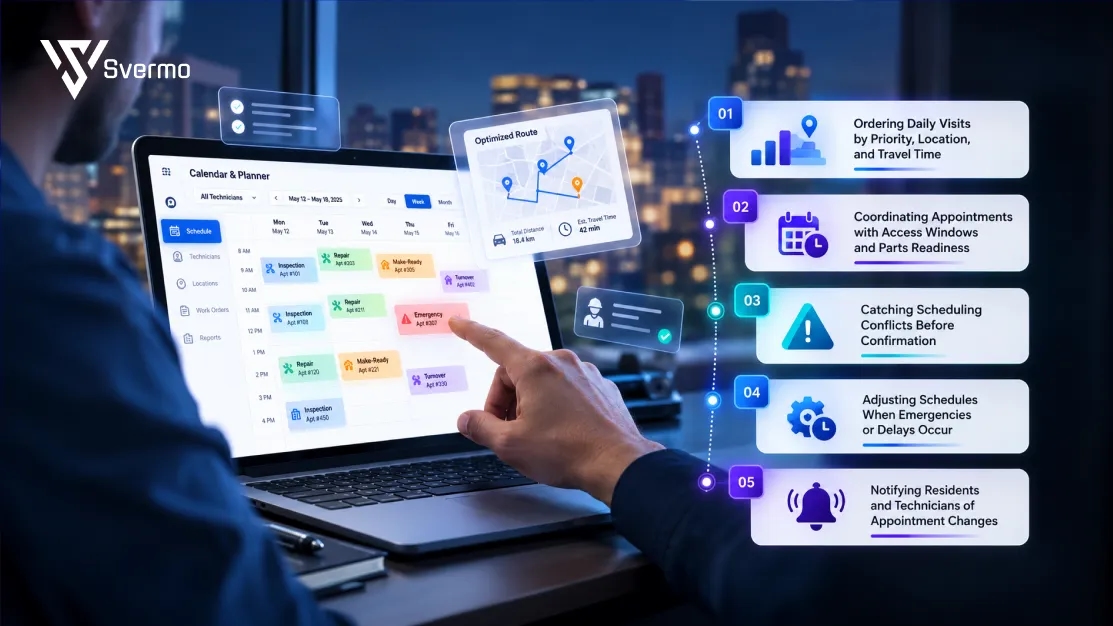
AI work order scheduling for maintenance teams organizes daily visits around property locations, travel time, resident availability, and repair readiness. The goal is to fit more planned work into the day without creating missed appointments or unnecessary return trips.
A frequent question from maintenance teams is:
“Scheduling one repair means checking technician'sn availability, waiting on parts, and finding a time that works for the resident, so my team spends a good part of every day playing phone tag. How much of that coordination could AI take over?”
AI can check technician availability, parts readiness, and resident scheduling preferences to suggest suitable visit windows. It can flag unresolved dependencies before a visit is confirmed.
Ordering Daily Visits by Priority, Location, and Travel Time
A technician scheduled to visit properties across town loses time when the route repeatedly doubles back. AI uses job locations, appointment windows, and estimated travel times to arrange visits in a practical order.
For AI work order routing for property maintenance, the route also needs to account for:
- Time to reach and enter each property.
- Expected repair duration.
- Fixed appointments that limit the order of visits.
Coordinating Appointments with Access Windows and Parts Readiness
A free time slot doesn’t mean a repair is ready to go. The resident needs to be available, access arrangements confirmed, and required parts on hand.
Before confirming a visit, coordinators check entry instructions, building restrictions, and parts status. If a replacement pump hasn’t arrived, rescheduling the repair avoids a wasted trip and a second appointment.
Catching Scheduling Conflicts Before Confirmation
A schedule breaks down when jobs overlap, travel takes longer than the gap between visits, or a technician arrives outside permitted access hours.
AI checks proposed appointments against existing bookings, travel estimates, job duration, and access restrictions. Flagging a conflict before confirmation gives the coordinator time to fix the schedule rather than explain a missed visit later.
Adjusting Schedules When Emergencies or Delays Occur
An emergency call or a repair that runs long affects the rest of the day. AI recalculates the affected visits, while coordinators review which appointments need to move and which residents need an update.
A revised route needs to account for the technician’s new arrival times, travel between properties, and any fixed appointments that remain unchanged.
Notifying Residents and Technicians of Appointment Changes
When a visit moves, residents need the revised arrival window, and technicians need the updated schedule and access details. An AI resident communication system connects maintenance schedule changes with resident notifications, reducing confusion over outdated appointment times.
Updates should cover the new arrival window, cancellations, changes to entry instructions, and delays when the system supports those notifications.
How Can Technicians Record and Complete Work Orders in the Field?
Technicians document their work through mobile work orders, recording repairs performed, test results, photos, and any unresolved issues. These records show maintenance managers what happened on site and provide a reliable history for future repairs.
A common concern among maintenance operations managers is:
“My technicians skip updating job status in the field because the current process is a hassle, so work orders stay open on paper long after the job is done. What would make it easier for them to keep each work order current without extra steps?”
Mobile workflows with quick status controls, voice-to-text notes, and photo uploads reduce manual entry. AI can turn technician notes into structured updates and prompt technicians to record required details before closing a work order.
Giving Technicians Job Instructions and Repair History
Technicians need the reported fault, relevant repair notes, and property-specific instructions to understand the job. For a recurring AC fault, previous notes about replaced components and earlier repair attempts provide useful context during diagnosis.
Recording Status, Notes, and Photos on Mobile Devices
Technicians update the work order as they complete each stage of the repair. Useful field records include:
- Work performed: Repairs completed and components replaced.
- Test results: Whether the equipment worked after the repair.
- Photos: Evidence of the fault and the completed work.
- Technician notes: Findings, measurements, and unexpected damage.
Accurate entries keep AI work order status tracking aligned with the work actually performed.
Documenting Incomplete Repairs, Parts Used, and Return Visits
When a repair remains unfinished, the technician records the reason and the work still required. For example, if a failed pump needs a replacement component, the record captures the diagnosis, parts used, and outstanding repair details.
This prevents the next technician from repeating the initial investigation and preserves a clear account of the work completed so far.
Verifying Completion Details Before Closing Work Orders
Before closing a work order, the technician records the final repair outcome and confirms the required checks are complete.
- The repair and replaced components are documented.
- Equipment tests and results are recorded.
- Required photos and notes are attached.
- Any unresolved issue remains documented rather than being marked complete.
Completed work orders create a useful maintenance history for the wider property team. An AI operations platform for multifamily operations directors connects these records with broader property operations and follow-on workflows.
How Should AI Manage Preventive Maintenance and Recurring Work Orders?
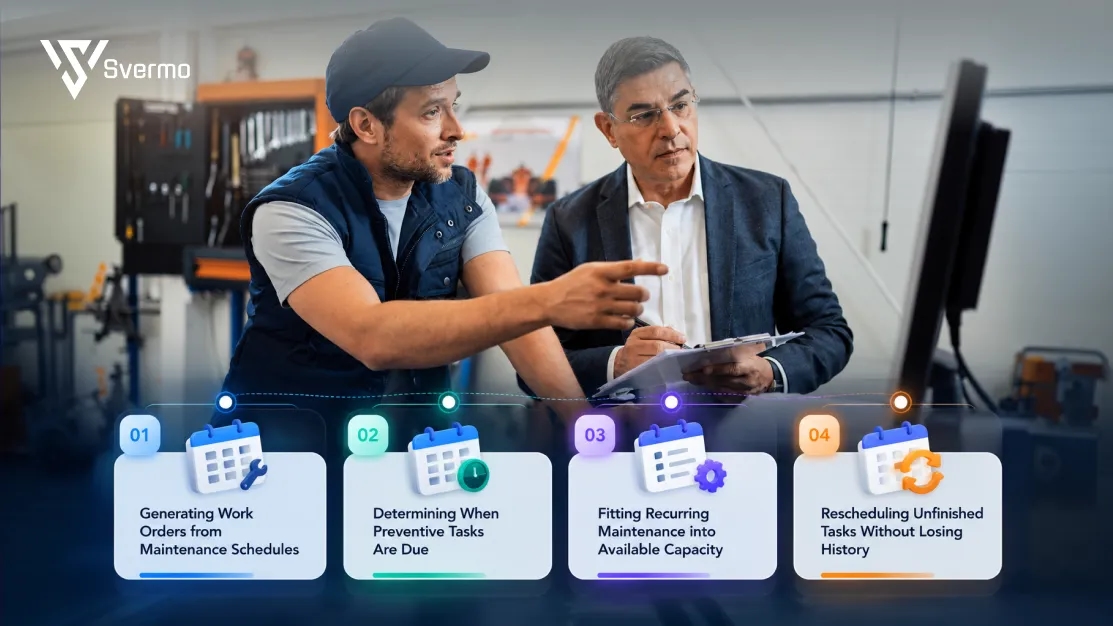
An AI maintenance management platform generates recurring work orders from maintenance plans, tracks due dates, and fits planned tasks into the team’s workload. This keeps routine maintenance visible alongside day-to-day repair requests.
Generating Work Orders from Maintenance Schedules
Maintenance plans define which tasks repeat and how often. AI uses these rules to create work orders for jobs such as monthly filter changes, quarterly drain cleaning, or annual servicing. Each work order records the task and property for that scheduled occurrence.
Determining When Preventive Tasks Are Due
Creating a work order and determining its due date are separate steps. AI preventive maintenance scheduling for property teams uses the plan’s intervals, due-date rules, and completion records to identify upcoming and overdue tasks.
For example, a quarterly service due in October stays on the upcoming list until its due date. If the deadline passes without completion, the task appears as overdue.
Fitting Recurring Maintenance into Available Capacity
Recurring jobs compete with resident repairs for technician time. AI work order scheduling for maintenance teams places planned tasks alongside existing commitments and available work hours.
If urgent repairs fill the week, routine filter changes still need to remain visible in the schedule. Managers review available capacity and adjust the workload without losing track of planned maintenance.
Rescheduling Unfinished Tasks Without Losing History
When a recurring task remains incomplete, its schedule needs updating without erasing the missed occurrence. Work order lifecycle management preserves the original due date, incomplete status, reason for delay, and revised date.
For example, if a service is postponed because the technician is unavailable, the unfinished work remains open for follow-up. The next maintenance cycle stays separate, preserving an accurate record of overdue and completed tasks.
How Do You Measure the Results of AI Work Order Management?
Measure an AI work order management platform by comparing maintenance performance before and after deployment. Focus on completion times, scheduling errors, manual effort, and service reliability.
Establishing Baselines for Work-Order Aging and Completion Times
Record four baseline metrics before rollout:
- Time to assignment: Request creation to job assignment.
- Time to completion: Request creation to verified completion.
- Work-order aging: Number of open jobs by age.
- Overdue rate: Share of jobs past their deadline.
Track urgent and routine repairs separately.
Measuring Changes in Conflicts, Duplicate Jobs, and Manual Work
Track scheduling conflicts, duplicate work orders, and staff time spent correcting records or chasing updates across the maintenance operations workflow. Compare these figures with the baseline to see where automation reduces manual work.
Comparing Results Across Different Workloads and Conditions
Compare similar properties, repair types, and reporting periods. Account for changes in request volume, staffing, and vendor availability.
Using Pilot Results to Decide Whether to Expand Deployment
Set success targets before the pilot. Check whether the platform improves work order lifecycle management, meets operational targets, and integrates reliably without creating excessive rework. If results fall short, fix workflow gaps and retest before expanding.
What Should You Look for in an AI Work Order Management Platform?

Choose an AI work order management platform that fits your maintenance process, connects with existing systems, and keeps managers in control of important decisions.
Checking Coverage of the Full Work-Order Lifecycle
Check that the platform tracks work orders from request intake through verified completion.
- Status visibility: Track each job's progress without searching across multiple systems.
- Connected records: Keep assignments, notes, and repair history linked to the work order.
- Exception tracking: Identify stalled jobs and incomplete records.
Verifying System Integrations and Data Synchronization
Confirm compatibility with your property management system and other maintenance tools.
- Property data: Unit and resident details match across systems.
- Status updates: Changes sync reliably between connected platforms.
- Sync failures: Errors are flagged and recoverable.
- Duplicate records: Repeated entries are identified and handled.
Evaluating Mobile Usability for Field Technicians
Check whether technicians can complete routine updates from their usual devices.
- Open assigned jobs and read repair instructions.
- Update statuses and add notes or photos.
- Record incomplete repairs and outstanding work.
- Navigate the workflow without unnecessary steps.
Technician feedback matters. Cumbersome mobile updates often lead to incomplete records or delayed data entry, weakening work order status tracking.
Checking Security, Access Permissions, and Audit Trails
Review how the platform protects resident and property information.
- Role-based access: Set appropriate permissions for technicians, vendors, and managers.
- Audit trails: Record who changed a work order and when.
- Data retention: Understand how long records are stored and how they are removed.
- Incident handling: Review the vendor's security incident procedures.
Understanding Which AI Decisions Need Approval
Clarify which actions happen automatically and which require staff review.
- Priority changes: Can managers review and override recommendations?
- Job assignments: Are unsuitable matches flagged?
- Schedule updates: Who approves changes affecting existing appointments?
- Resident notifications: Which messages are sent automatically?
- Decision records: Are recommendations and overrides documented?
Testing the Platform with Real Maintenance Scenarios
Use representative work orders to assess whether the platform fits your team's actual workflow.
- Urgent repair: Does it flag the issue appropriately?
- Duplicate request: Does it identify repeated reports?
- Missing information: Does it flag gaps before dispatch?
- Vendor assignment: Does it follow your assignment rules?
- Schedule disruption: Does it identify affected appointments?
Compare results with your current process, focusing on accuracy, exception handling, and manual corrections. These checks provide a practical basis for comparing AI maintenance workflow automation tools.
For property maintenance teams, evaluating AI means looking beyond whether a platform automates individual tasks. The more important question is how well it connects work orders with the surrounding maintenance process, from accurate records and staff decisions to completed repairs. This is the operational perspective behind Svermo’s approach to AI in real estate operations: evaluating automation in the context of the workflows it needs to support
Ready to give your maintenance backlog a reality check?
Discuss your maintenance challenges and identify the right starting point for automation.
Final Takeaway!
A maintenance backlog reveals where the workflow breaks down: jobs waiting too long for assignment, repeat visits caused by missing details, or coordinators chasing updates across messages. An AI work order management platform brings these moving parts into one process, helping teams track what needs attention and what remains unfinished. How much time does your team spend managing repairs, and how much actually goes into getting them fixed?
At Svermo, maintenance is part of a bigger property operations picture. Connecting repair workflows with resident communication and administrative tasks is where an AI real estate operations automation system fits into the conversation. Start with one recurring bottleneck, measure whether automation reduces it, and build from there. Want to discuss where your workflow gets stuck? Contact us.
 https://www.linkedin.com/in/saanvi-verma-38711a36a
FAQs
The best AI work order management platforms for property maintenance depend on portfolio size, existing software, maintenance volume, and automation requirements. Compare integration compatibility, reporting, mobile access, and how much manual work remains before choosing a platform.
To find an AI work order management platform that works with my property management system, check supported integrations, API availability, data-sync limitations, and compatibility with your current software version. Ask vendors to demonstrate the specific connection your team needs.
Traditional maintenance software primarily records and organizes work orders. An AI maintenance management platform adds capabilities such as extracting information from requests, identifying patterns, or recommending actions. The actual difference depends on the product's AI features and how they are configured.
AI maintenance workflow automation supports larger portfolios by standardizing routine processes and consolidating operational data across properties. This gives regional managers a more consistent view of maintenance activity, provided property records and workflows are configured consistently.
When comparing top AI maintenance management platforms for operations managers, look beyond feature lists. Assess portfolio compatibility, reporting depth, implementation requirements, vendor support, data governance, and the level of human oversight required for automated decisions.
An AI property maintenance platform can support both property types, but their workflows differ. Single-family portfolios often involve dispersed homes and local vendors, while multifamily properties frequently coordinate repairs across shared buildings and common areas. Confirm that the platform supports your portfolio structure.
When evaluating leading AI maintenance workflow automation tools, check whether their capabilities address your biggest operational bottlenecks, integrate with your existing systems, and provide measurable improvements during a pilot. Prioritize demonstrated fit over vendor rankings or broad AI claims.