

AI Real Estate Operations Automation System: Automate Repetitive Administrative Workflows


Get a summary of this article with your favorite AI





AI Summary
- •Automate repetitive admin tasks: Use AI for lease administration, document processing, invoice approvals, maintenance requests, and resident communication.
- •Measure real operational gains: Track time saved, extraction accuracy, error rates, processing costs, and team capacity.
- •Connect existing systems: Use real estate workflow automation to move information between property management, accounting, and CRM platforms.
- •Prioritize accuracy and security: Set confidence thresholds, human reviews, role-based access, and audit trails to protect property and resident records.
- •Plan before scaling: At Svermo, work on residential AI workflows highlights the importance of property-specific rules, reliable integrations, and connected task handoffs.
A resident reports a water leak after office hours. Who records the request, decides its priority, assigns a vendor, and follows up? What happens when a lease renewal is due, but the date is buried in a document? And how does your team know which requests are still waiting for action?
A real estate operations automation system connects these steps. It captures maintenance requests, creates work orders, routes them to the right team, track lease dates, extract details from documents, and triggers follow-ups.
It also connects with your existing property management systems, so staff don't have to update every record separately. See how AI for property management applies to leasing, maintenance, and other day-to-day residential workflows.
Can your current setup handle these tasks across multiple properties? Can it keep tenant, lease, and maintenance records in sync? Can your team see where each request stands without chasing updates?
At Svermo, an AI product company our work with products covers residential workflows such as leasing, maintenance coordination, inspections, and tenant communication. These workflows need to connect from the first request to the final action, with the right property details and task status available to the people handling them.
Still juggling leases, invoices, and maintenance requests manually?
Pick one repetitive workflow and see how AI can take it off your team's daily to-do list.
Which Administrative Tasks in Real Estate Can Be Automated With AI?
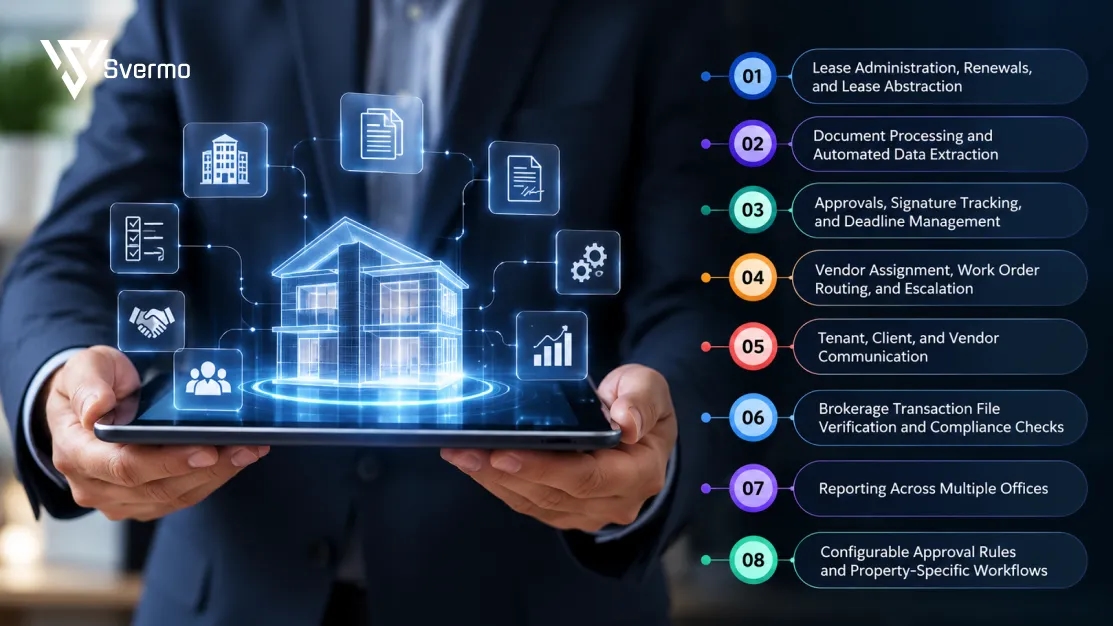
An AI real estate operations automation system uses real estate workflow automation to handle repetitive administrative tasks across residential leasing, maintenance, document processing, communication, and reporting. It extracts information, updates records, routes requests, and tracks pending actions. This is how AI for real estate operations reduces routine administrative work across property management and brokerage teams.
Lease Administration, Renewals, and Lease Abstraction
AI-powered lease abstraction extracts key details from lease documents, including:
- Tenant and property details
- Lease start and end dates
- Monthly rent and security deposits
- Renewal terms and notice periods
- Rent escalation clauses
- Maintenance responsibilities
- Special terms and conditions
The system transfers these details to property records, tracks renewal dates, and creates reminders for upcoming deadlines. This supports automated lease administration without requiring staff to enter every lease detail manually.
For example, when a lease approaches its renewal period, the system flags the record and creates a follow-up task for the property manager. The manager reviews the lease and contacts the resident. For a broader look at how AI handles application follow-ups, lease coordination, and other stages of the leasing process, see Leasing AI for property management.
Document Processing and Automated Data Extraction
Intelligent document processing (IDP) reads rental applications, identity documents, leases, invoices, inspection reports, and vendor bills. It identifies the document type and extracts the required fields.
For a vendor invoice, it extracts the vendor name, invoice number, property ID, amount, due date, and service description. It then matches these details against vendor records and the related work order. With property management system (PMS) integration, verified information can also be transferred to the relevant property records.
If the invoice amount differs from the approved work order, or required information is missing, the system flags the discrepancy for review. This is an example of human-in-the-loop automation: the system handles extraction and initial checks, while a team member reviews exceptions.
Approvals, Signature Tracking, and Deadline Management
Real estate workflow automation routes vendor invoices, maintenance expenses, lease amendments, and renewal offers according to predefined approval rules.
For example:
- A maintenance expense within the approved limit goes to the designated property manager.
- An expense above that limit goes to the regional manager.
- An approved lease amendment moves to the required signature stage.
- Pending signatures trigger reminders.
- Overdue approvals are escalated to the next approver.
The system records approval decisions, timestamps, and changes to each request. This is part of workflow orchestration, where connected tasks move through the required steps without staff manually forwarding every request.
Vendor Assignment, Work Order Routing, and Escalation
Real estate task automation classifies maintenance requests, links them to the correct property, and creates work orders. A plumbing request, for example, goes to the assigned in-house maintenance team or an approved plumbing vendor, depending on the property's setup.
The system tracks vendor acceptance, work order status, and completion. It sends reminders for overdue jobs and escalates unresolved requests to the property manager. Emergency decisions and unexpected repair expenses remain with the responsible team member.
When maintenance requests come in by phone, Voice AI captures the details and passes them into the relevant response workflow.
Tenant, Client, and Vendor Communication
AI sorts incoming messages from email, resident portals, and online forms by topic and routes them to the relevant team.
For example, maintenance complaints go to the maintenance team, rent queries go to accounts, and lease questions go to the property manager.
Routine communication includes:
- Rent due and lease renewal reminders
- Maintenance request confirmations
- Inspection and appointment notifications
- Missing document requests
- Work order status updates
- Vendor assignment notifications
Disputes, legal questions, and sensitive resident concerns are routed to a team member for review by Tenant AI for property management.
Brokerage Transaction File Verification and Compliance Checks
AI checks residential brokerage transaction files against a required document checklist. It identifies missing forms, incomplete fields, unsigned documents, and mismatched details such as names, property information, and dates.
For example, if a required disclosure is missing, the system flags the file and creates a task for the agent or transaction coordinator. The broker or designated compliance reviewer still verifies the file and makes decisions that require professional judgment.
Reporting Across Multiple Offices
Real estate back-office automation collects data from connected workflows and prepares reports covering:
- Upcoming lease renewals and expirations
- Open and overdue maintenance requests
- Vendor invoices awaiting approval
- Work orders awaiting completion
- Resident requests awaiting responses
- Documents waiting for review
Companies can use shared reporting rules across offices while maintaining separate vendor lists, approval limits, and escalation procedures for each property.
Configurable Approval Rules and Property-Specific Workflows
Workflow rules can vary by property, request type, expense amount, priority, assigned team, and approval level.
For example, one property may send routine repairs to an in-house maintenance team, while another routes them to approved external vendors. A repair below the property's spending limit may need only property manager approval, while a higher-cost repair requires regional approval.
The system applies the relevant rules when routing requests. If an expense exceeds the limit or a request has no assigned vendor, it flags the exception for review.
What Results Can Operations Teams Realistically Expect from an AI Automation System?
The results of real estate operations automation show up in everyday work: less time spent entering data, checking documents, assigning requests, and following up on approvals. How much time a team saves depends on its workload, document quality, existing systems, and the workflows it automates.
AI vs. Manual Lease Abstraction: Accuracy, Speed, Cost, and Review Effort
When staff review a lease manually, they locate details such as rent, lease dates, security deposits, renewal terms, and notice periods, then enter them into property records. AI lease abstraction extracts these fields and prepares them for review.
| Measurement | Manual Abstraction | AI-Assisted Abstraction |
|---|---|---|
Data extraction | Staff find and enter each detail | AI extracts the required fields |
Processing time | Staff read and process each document | AI handles the initial reading and extraction |
Accuracy checks | Staff check manually entered details | Staff verify extracted fields and flagged errors |
Cost | Employee time and review effort | Setup, processing, and review costs |
Exceptions | Staff identify errors during review | Unclear text and unusual clauses are flagged |
AI does not guarantee error-free lease records. Scanned documents, handwritten changes, and unusual clauses still need human review.
Before-and-After Example: A Mid-Sized Property Manager's Workflow
A property manager handling several residential properties may spend hours recording lease dates, creating work orders from resident emails, matching invoices, and chasing approvals. With automation, these routine steps follow configured workflows, leaving staff to check mismatched records and handle decisions that need attention.
Changes Team Responsibilities: From Data Entry to Oversight
Property administrators spend less time entering lease details. Maintenance coordinators focus on delayed jobs and vendor issues, while accounts staff review invoice discrepancies. Property managers retain control of approvals and resident concerns.
Increasing Operational Capacity
When a property manager takes on more properties, the same workflows can be reused with each property's records, vendors, approval limits, and assigned teams. New properties may still need different rules, but the team does not have to build every routine process from scratch.
Can the System Extract Data and Update Your Existing Real Estate Systems Automatically?

Yes. An automation system that also comes in AI HOA management platform for property management companies extracts details from leases, invoices, and resident applications, then transfer them to your existing property management, accounting, or CRM platform.
Connecting Lease, Invoice, and Contract Data to PMS, ERP, and CRM Records
PMS integration connects extracted document details with the right property records. The system reads lease dates and rent amounts, along with invoice totals and vendor details, and matches them to the relevant records.
- Example: When a signed lease comes in, the system picks out the resident's name, unit number, rent, and lease end date, then adds them to the matching property record.
Read-Only Integrations vs. Two-Way Data Synchronization
A read-only connection lets the system view existing records but does not change them. A two-way connection lets both read and update information. The choice depends on whether you only need to check records or want to automate data entry too.
- Example: A read-only connection checks an invoice against a work order. A two-way connection can also update the invoice status after approval.
Native Integrations, APIs, and Custom Connectors
Some platforms offer ready-made connections, known as native integrations. Others connect through APIs, which let systems share specific information. Custom connectors are used when a setup needs extra steps or data mapping.
- Example: An API connection sends the lease end date to the correct resident record in the property management system, so staff don't have to enter it manually.
Handling Incompatible Systems, Failed Updates, and Duplicate Records
Suppose a lease shows Unit 204, but the property management platform for landlords and decision makers use a different unit reference. The system holds the update for staff review rather than guessing which record to change. The connection needs to match these details correctly and catch failed updates or duplicate records before they cause problems.
- Example: If an invoice names a property as "Building A", but the accounting system uses a property ID, the system checks the mapping first. If it cannot find a match, it sends the invoice for staff review.
Keeping Existing Systems While Automating Workflows Across Platforms
AI automation integration for real estate does not require you to replace your current PMS, ERP, or CRM. The automation system connects the platforms your leasing, maintenance, and accounting teams already use, as long as they support the required connections.
- Example: A resident's maintenance email creates a work order in the PMS, sends the job details to an approved vendor, and passes the completed job details to accounting for invoice matching.
Before rollout, test the connections with real records. Check what information moves between systems and what happens when an update fails.
How Accurate Is the System, and What Happens When AI Is Uncertain?
AI accuracy depends on the document and the information it needs to read. Clear, typed leases are easier to process than faded scans, handwritten changes, or poorly formatted invoices. Intelligent document processing (IDP) helps extract information from these files, but unclear details still need staff review.
Confidence Thresholds and Automated Exception Detection
A confidence threshold sets how sure AI must be before saving an extracted detail. If the result falls below that limit, it goes to a staff member for checking.
For example, the system may flag:
- A lease end date that is blurred or overwritten.
- An invoice amount that differs from the work order.
- A resident record with no unit number.
Human-in-the-Loop Review for Lease Data, Documents, and Approvals
Human-in-the-loop review means staff check information that needs a closer look before it is added to a record or used to approve a request. This is important when automated lease administration involves unclear terms, payment details, or property expenses.
Typical review tasks include:
- Checking rent, deposits, and renewal terms against the signed lease.
- Reviewing invoice charges that differ from the work order.
- Approving maintenance costs above the property's spending limit.
Overrides, Correction Tracking, and Audit Trails
When AI enters a detail incorrectly, staff can replace it with the correct value. The system keeps both versions, along with the name of the person who made the change and when it happened. This correction history also helps teams spot recurring issues in real estate document processing automation.
For example, if AI reads monthly rent as ₹18,000 instead of ₹28,000, an administrator corrects the amount. The correction history keeps the original figure for future reference.
Maintaining Data Quality as Documents and Workflows Change
Lease terms, vendor details, and approval limits change as properties are managed. These updates need to be reflected in the system so old information does not carry over into new records or tasks.
Review these details when changes happen:
- Lease changes: Update rent, end dates, and renewal reminders.
- Vendor changes: Replace old contact and payment details.
- Approval changes: Update spending limits and assigned approvers.
How Secure Is the System, and What Should Real Estate Firms Check Before Adopting It?
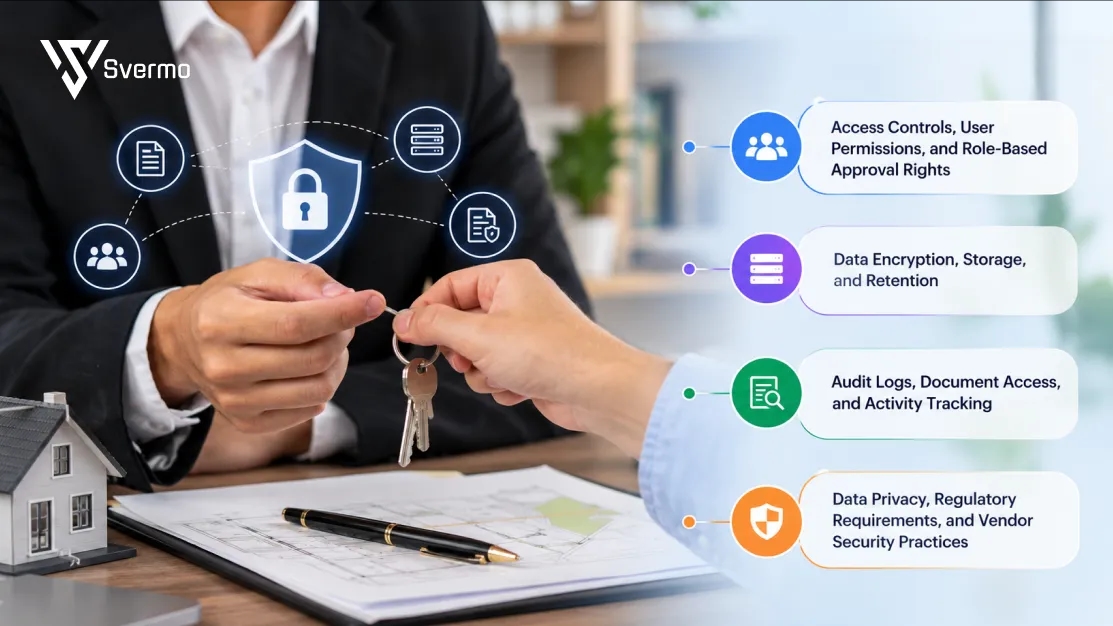
An AI real estate operations system keeps property details safe, control who can see them, and track important changes. Before choosing one, check how it stores data, who gets access, and what happens when someone views or changes a record.
Access Controls, User Permissions, and Role-Based Approval Rights
Not everyone on your team needs access to every record. Set permissions based on each person's job and give approval rights according to their role and spending limit.
For example:
- Leasing staff can view lease agreements and resident details.
- Maintenance coordinators can access work orders and vendor information.
- Property managers can approve expenses within their assigned limits.
Data Encryption, Storage, and Retention
Encryption keeps information protected while it moves between systems and while it is stored. Also check where your documents are kept, how long they stay there, and how they are removed when no longer needed.
| What to check | What to ask |
|---|---|
Data encryption | Is information protected while stored and transferred? |
Storage location | Where are resident records and lease documents stored? |
Data retention | How long does the provider keep your records? |
Data deletion | Can your team request permanent deletion when needed? |
Audit Logs, Document Access, and Activity Tracking
Your team should be able to see who opened a document, changed a record, approved an invoice, or downloaded a file. These activity records make it easier to check what happened when something goes wrong.
For example, if an invoice changes from ₹12,000 to ₹15,000, you should be able to see the original amount, the new amount, who changed it, and when.
Data Privacy, Regulatory Requirements, and Vendor Security Practices
Resident applications, identity documents, leases, and payment details need careful handling. Ask the provider how it uses this information, who it shares it with, and whether customer documents are used to train its AI models. Also check which data privacy rules apply to your business.
Before signing up, ask:
- Are customer documents used to train AI models?
- Can your company control who gets access to its data?
- What happens if there is a data breach?
- Can the provider share security reports or certifications, such as SOC 2 or ISO 27001?
Don't stop at checking the provider's security claims. Make sure your own team knows who can access each type of record and what they are allowed to do with it.
Also Read: Use cases of AI Real Estate System
How Do You Measure ROI, and How Long Does It Take to See a Return?
Measure ROI by comparing the time and cost of handling tasks manually with the cost of real estate operations automation. Track staff hours saved, errors reduced, and the cost of processing each unit, property, or transaction. The time needed to see a return depends on workflow volume, setup effort, and ongoing costs.
A question owners of growing real estate businesses commonly raise is:
"I am running a growing real estate business, and our admin costs keep rising as we add properties. We have been told automation can help, but I do not know where to start or whether it will pay off. Can you suggest recommended companies for real estate operations automation, give me a step-by-step plan to get started, and tell me how long it usually takes to see a return?"
Start by measuring the time and cost of one high-volume workflow, then pilot its automation on a small scale. Include setup, integration, training, and ongoing costs when calculating ROI. The payback period depends on task volume, implementation effort, and actual savings.
Measuring Hours Saved, Error Rates, and Cost Per Unit, Property, or Transaction
Start by recording how long your team spends on lease data entry, invoice checks, maintenance requests, and follow-ups. Once real estate workflow automation is in place, compare the same tasks against that baseline.
Track these measures:
- Staff hours spent per task or transaction.
- Errors in lease, invoice, and resident records.
- Average cost to process each unit, property, or transaction.
- Number of tasks completed within the expected time.
Accounting for Implementation, Integration, and Ongoing Costs
Include the full cost of setting up and running the system, not just the subscription or usage fee.
Account for:
- Initial setup and workflow configuration.
- Connections to existing property management and accounting systems.
- Data cleanup and migration.
- Staff training and testing.
- Ongoing support, maintenance, and usage charges.
Measuring Increased Operational Capacity as the Business Scales
To measure how much manual work in real estate operations has been reduced, compare the number of properties, units, or transactions your team handles before and after automation. If the team takes on more work without adding the same amount of administrative time or headcount, that is an operational gain.
For example, compare the time needed to manage lease renewals and maintenance requests across 500 units with the time needed after expanding to 700 units.
Time Savings vs. Actual Cost Reduction
Fewer hours spent on admin work do not always mean an immediate drop in costs. Staff may use that time to manage more properties, respond to residents, or review exceptions. That increases capacity, but it is different from reducing actual spending.
Measure these separately:
- Time saved: Staff hours freed from repetitive tasks.
- Cost reduced: Actual spending removed, such as overtime, temporary admin support, or outsourced data entry.
- Capacity gained: Additional units or transactions handled by the existing team.
Factors That Determine Time to ROI
The time needed to recover the investment depends on how often a workflow runs and how much manual work it removes. High-volume tasks with clear rules are generally easier to measure than workflows with frequent exceptions.
Key factors include:
- Number of properties, units, and transactions processed.
- Current time and cost per task.
- Quality and consistency of existing records.
- Complexity of integrations and approval rules.
- Staff adoption and the amount of human review still required.
How Do You Get Started With Real Estate Operations Automation?
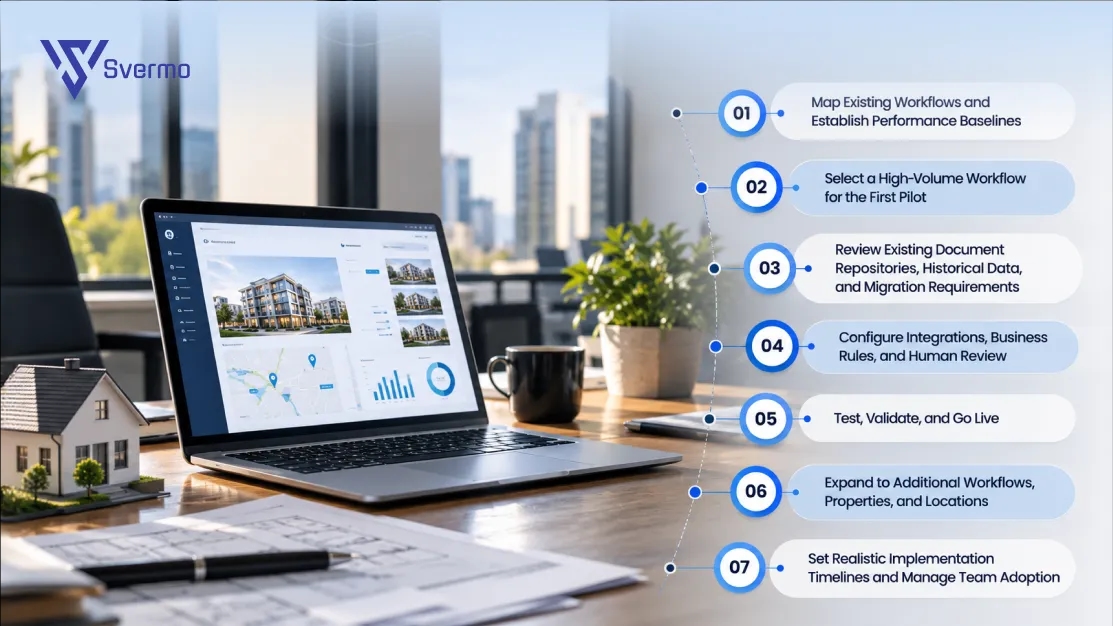
To understand how to automate real estate operations, start with one workflow, document how your team handles it today, and choose a task to automate first. A focused rollout gives you time to test the process, fix issues, and measure results before expanding across more properties.
Map Existing Workflows and Establish Performance Baselines
Action: Document each step in the current process, who handles it, which systems they use, and where approvals or handoffs happen. Record the time spent, common errors, and pending tasks.
Decision: Identify which steps are repetitive and rule-based, and which still need staff judgment.
Example: For lease renewals, map when expiry dates are checked, when residents receive reminders, who prepares renewal offers, and who approves changes to rent or lease terms.
Select a High-Volume Workflow for the First Pilot
Action: Choose a task that happens regularly and follows clear rules. Lease renewal reminders, invoice checks, and maintenance request routing are possible starting points for real estate workflow automation.
Decision: Pick a workflow with enough volume to measure results but few enough exceptions to keep the first pilot manageable.
Example: Start with maintenance requests across one residential property. Automate request capture, work order creation, and vendor assignment before extending the process to the full portfolio.
Review Existing Document Repositories, Historical Data, and Migration Requirements
Action: Check where leases, invoices, resident records, vendor details, and work orders are stored. Look for missing information, duplicate records, outdated details, and inconsistent property IDs. This review is also an important step before introducing real estate document processing automation.
Decision: Decide which records need to be migrated, which can stay in their current location, and what needs cleaning before the system uses them.
Example: Before automating lease renewals, check that resident names, unit numbers, lease end dates, and contact details match across your lease documents and property records.
Configure Integrations, Business Rules, and Human Review
Action: Connect the systems involved in the selected workflow. Set rules for task assignment, approval limits, reminders, and exceptions. Include human-in-the-loop review for decisions that need staff judgment.
Decision: Decide which actions can happen automatically and which require approval from a property manager or another responsible employee.
Example: Routine maintenance requests can go to an approved vendor automatically, while a repair estimate above the property's spending limit goes to the property manager for approval.
Test, Validate, and Go Live
Action: Run the workflow with real examples and check document extraction, record updates, notifications, approvals, and exception handling. Fix errors before opening it to the full team.
Decision: Agree on the checks the workflow must pass before it goes live, including accuracy, correct routing, and reliable updates to existing records.
Example: Test several maintenance requests, including an urgent plumbing issue, a routine repair, and a request with missing property details. Confirm that each follows the correct route.
Expand to Additional Workflows, Properties, and Locations
Action: Once the pilot runs reliably, apply the process to other workflows and properties. Reuse shared rules where possible, while keeping property-specific details separate. This is where real estate operations automation starts extending beyond the first task and helps reduce manual work in real estate platform for property operations across the portfolio.
Decision: Choose what to expand next based on task volume, staff feedback, and the results of the first pilot.
Example: After testing maintenance routing at one property, extend it to other locations. Then introduce invoice checks using the same vendor records and approval limits.
Set Realistic Implementation Timelines and Manage Team Adoption
Action: Set timelines based on workflow complexity, data quality, integration work, and staff training. Show employees how the new process works and explain when they need to review or step in.
Decision: Decide who owns the rollout, who handles staff questions, and how often the team will review results after launch.
Example: Assign an operations manager to review the first month's maintenance requests, collect feedback from coordinators, and update routing rules when recurring issues appear.
How Do You Choose the Right Real Estate Operations Automation Platform?
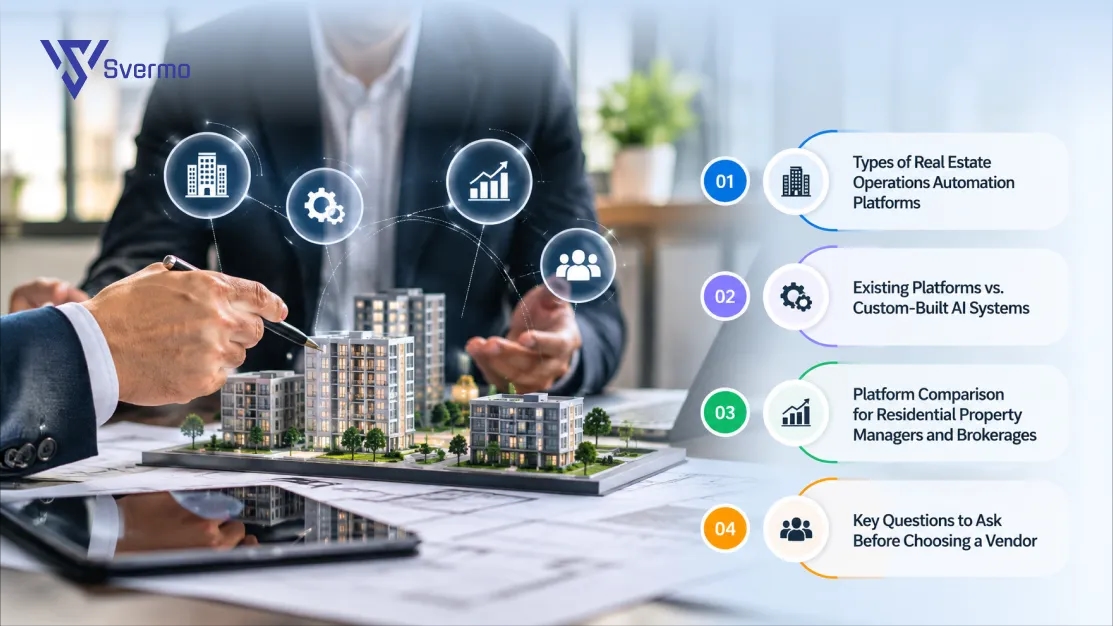
Choose a platform based on the tasks you need to automate, the systems your team already uses, and how much flexibility your workflows require. A residential property manager handling leases, maintenance, and invoices has different needs from a brokerage managing listings, client records, and transaction files. The platform should fit your day-to-day operations rather than force your team to change every existing process.
Brokerage owners and managing brokers often ask:
"I am running a real estate brokerage with 35 agents, and I spend most of my week chasing signatures, checking transaction files, and answering the same compliance questions over and over. We keep missing deadlines because everything lives in email and spreadsheets. Can you suggest companies that offer an AI real estate operations automation system to handle this admin work, and tell me which ones are best for a mid-sized brokerage?"
For a 35-agent brokerage, look for platforms that automate transaction file checks, signature tracking, deadline reminders, and compliance workflows. Compare CRM integrations, customization, user permissions, and pricing against your existing systems and transaction volume.
Types of Real Estate Operations Automation Platforms
Most real estate process automation tools fall into four categories. Each handles a different part of the work, so the choice depends on whether you need document handling, task routing, or automation across several systems.
| Platform type | What it handles | Example |
|---|---|---|
Automation built into PMS and ERP platforms | Routine reminders, record updates, and basic approvals | Sending lease renewal reminders or updating payment status |
Specialist document processing platforms | Reading leases, invoices, applications, and extracting key details | Pulling rent amounts and lease dates from signed agreements |
Workflow orchestration and robotic process automation (RPA) platforms | Moving information and tasks between systems based on set rules | Sending an approved invoice from a property management system to accounting |
Custom-built AI systems | Workflows that need specific business rules or connections between several platforms | Matching maintenance requests to property records, approved vendors, and spending limits |
These categories can also work together. A document processing tool might extract lease details, an AI property management platform stores the records, and a separate real estate workflow automation layer manages reminders and approvals.
Existing Platforms vs. Custom-Built AI Systems
Built-in automation is often enough when your team follows standard processes. A custom-built system becomes relevant when your workflows involve specific approval rules, several disconnected platforms, or steps that standard features do not cover.
| What to compare | Existing platform features | Custom-built AI system |
|---|---|---|
Setup | Usually quicker to configure | Requires planning and development |
Customization | Limited to available settings | Built around specific workflows |
Flexibility | Works within the platform's existing features | Can connect different systems and business rules |
Maintenance | Managed as part of the platform | Requires ongoing technical support |
Cost | Often included in an existing subscription or charged as an add-on | Depends on scope, integrations, and ongoing maintenance |
For example, a property manager may only need built-in reminders for lease expiry. But if the process also involves checking renewal terms, preparing an offer, routing it for approval, and updating records across separate platforms, a custom workflow may be needed.
This is the kind of distinction that comes up when working on residential AI products at Svermo: the requirement is not always to automate one task, but to connect the steps around it without disrupting the team's existing process.
Platform Comparison for Residential Property Managers and Brokerages
The daily workload should guide your choice. Property managers usually need automation around leases, resident requests, maintenance, and invoices. Brokerages often need it for transaction documents, client records, listing updates, and follow-ups.
| What to assess | Residential property managers | Residential brokerages |
|---|---|---|
Daily workflows | Lease administration, maintenance requests, inspections, invoice approvals | Listing updates, transaction files, client communication, document checks |
Existing systems | Property management, accounting, payment, and maintenance platforms | CRM, transaction management, document storage, and listing platforms |
Custom rules | Property-specific maintenance rules, vendor lists, approval limits | Transaction deadlines, document requirements, and office approval processes |
Growth requirements | Adding properties, units, and maintenance teams | Adding agents, branches, and transaction volume |
Technical support | Integrations with property and accounting records | Connections between CRM, transaction, and document systems |
A property management automation platform should support property-level settings, vendor assignments, lease records, and maintenance workflows.
Key Questions to Ask Before Choosing a Vendor
Ask vendors to demonstrate your actual workflows, not just show a list of AI features. A useful evaluation of the best real estate workflow automation platform should cover these areas:
- Integrations: Does it connect with your existing property management system (PMS), CRM, and accounting platform?
- Data updates: Can it write approved information back to existing records, or does it only extract and display details?
- Security: Can you control access by role, track changes, and set data retention rules?
- Accuracy: What happens when a lease date, rent amount, or invoice detail is unclear?
- Multiple locations: Can different properties or offices follow their own approval rules?
- Costs: What do setup, integrations, usage, training, and ongoing support cost?
- Support: Who handles failed integrations, workflow changes, and technical issues after launch?
Not sure what to automate first?
Let's look at your current processes, spot the bottlenecks, and identify where automation makes practical sense.
Final Thoughts
A lease renewal shouldn't get stuck because someone missed a date, and a maintenance invoice shouldn't need three people to figure out which work order it belongs to. That's the kind of admin trail a real estate operations automation system needs to clean up. The real question is: which handoffs are still slowing your team down?
At Svermo, working on AI for residential real estate has shown us that the tricky part often isn't extracting information. It's getting that information to the right property record, applying the correct approval rules, and keeping every handoff connected. If you're reviewing these details for your own operations, contact us to discuss what needs attention before automation begins.
 https://www.linkedin.com/in/saanvi-verma-38711a36a
FAQs
Yes, AI connects with existing property management, accounting, and CRM platforms to automate tasks without requiring a complete system replacement.
Yes, it can manage shared workflows while applying property-specific rules for vendors, maintenance priorities, and approval limits.
Yes, teams can set approval rules based on property, task type, invoice amount, department, or responsible manager.
Unclear or mismatched details are sent for staff review and correction before they update the relevant records.
Yes, APIs, custom connectors, or controlled file transfers can link legacy systems when direct integrations are unavailable.
Common requirements include leases, amendments, invoices, work orders, resident and vendor details, property records, and approval rules.
The cost depends on workflow complexity, integrations, customization, number of properties, setup, and ongoing support.