
AI Operations Platform for Multifamily Operations Directors: Keep Unit Turns, Move-Ins & Inspections on Track


Get a summary of this article with your favorite AI





AI Summary
- •Multifamily operations automation takes on routine scheduling, task assignments, deadline tracking, and follow-ups, freeing teams to focus on decisions that need human judgment.
- •An AI operations platform for multifamily operations directors connects unit turn tasks, move-ins, move-outs, and inspections to prevent missed handoffs and avoidable vacant days.
- •Clear automation rules, approval steps, action logs, and correction controls keep AI actions accountable across properties.
- •Reliable PMS integration keeps unit records, lease dates, inspection findings, and readiness statuses consistent across connected systems.
- •Svermo’s Leasing AI focuses on prospect qualification, tour scheduling, follow-ups, and vacancy matching, making its leasing capabilities relevant when evaluating how leasing workflows connect with unit readiness.
A unit turn gets delayed when one team finishes its part and the next step gets missed. Maintenance wraps up, make-ready falls behind, or leasing is left waiting for confirmation that the unit is ready. An AI operations platform for multifamily operations directors keeps these tasks connected, tracks what still needs to get done, and flags delays before they push back the schedule.
Things get trickier when plans change. An inspection finds more work to do. A make-ready date slips. The move-in date is getting closer. The platform needs clear rules for updating related tasks, getting approval when needed, and keeping unit details in sync with the property management system.
From Svermo’s perspective as an AI platform, we look at the small gaps that throw off a unit turn: an inspection finding that changes the make-ready schedule, a completed task that never reaches leasing, or a move-in date that stays unchanged after work runs late. Task updates need to reach the next person, and decisions about unit readiness need clear human sign-off.
Ready to Stop Chasing Unit Turn Updates?
Connect inspections, make-ready tasks, and move-in dates before another missed handoff adds vacant days.
Which Multifamily Operations Tasks, Such as Unit Turns, Move-Ins, Move-Outs, and Inspections, Can AI Take on First?
AI takes on repetitive tasks first: scheduling inspections, assigning make-ready work, tracking deadlines, and following up on unfinished tasks. These tasks follow clear rules and repeat throughout the unit turn process, making them a practical starting point for multifamily operations automation.
A common concern among multifamily operations directors look like this:
“My multifamily operations team cannot keep pace with the daily workload, so unit turns, move-ins, and inspections stack up between properties and the team only catches up by working longer days. I want to understand how AI can take on that routine workload.”
AI takes on repetitive scheduling, task assignments, deadline tracking, and follow-ups. This reduces routine coordination work while leaving decisions about inspection findings and unit readiness to your team.
Automating Routine Scheduling, Task Assignments, and Follow-Ups
After a move-out, AI schedules the inspection, assigns make-ready tasks, tracks due dates, and follows up on unfinished work. When an inspection finds extra work, the system updates related tasks and deadlines according to the rules set by your team.
For example, AI for multifamily unit turn scheduling handles:
- Booking inspections around inspector availability.
- Assigning make-ready tasks based on work type and team availability.
- Setting deadlines and following up on unfinished tasks.
- Updating schedules when inspection findings change the plan.
- Sharing confirmed completion updates with leasing.
Each step stays connected to the next, reducing delays caused by missed handoffs.
Separating Tasks AI Can Handle from Those Needing Human Judgment
Agentic AI for real estate can take routine operational steps, such as scheduling an inspection or following up on an overdue make-ready task, while leaving decisions about conflicting schedules and unit readiness to your team.
| AI handles | Your team decides |
|---|---|
Booking inspections within approved time slots | Resolving schedule conflicts |
Assigning standard make-ready tasks | Deciding how to handle unexpected inspection findings |
Following up on overdue tasks | Approving changes to move-in dates |
Updating task status from confirmed records | Confirming the unit is ready for its next resident |
When evaluating an AI property operations platform for multifamily, check its automation rules, approval requirements, and action history. The platform records which tasks ran automatically, which actions required approval, what changed, and who approved the decision. Your team retains a clear record of AI actions and corrections.
How Can AI Prevent Unit Turn Delays and Reduce Avoidable Vacant Days?
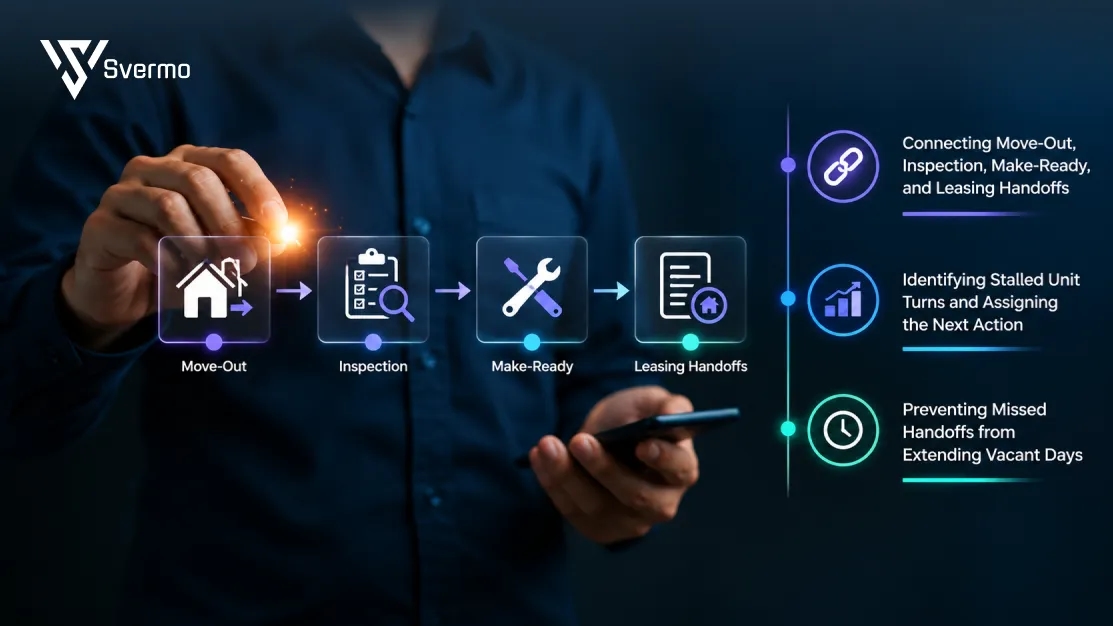
AI reduces avoidable vacant days by connecting each unit turn task to the next required step, updating deadlines when plans change, and assigning follow-up actions when work falls behind. The key is tracking what is holding up the unit and what needs to happen next.
Multifamily operations directors often ask this kind of query:
“One of our recent unit turns sat idle for almost two weeks because the handoff between maintenance, make-ready, and leasing fell through, and the vacant days added up before anyone noticed. I want to understand how AI can keep that kind of handoff from stalling again.”
AI links dependent tasks, tracks outstanding work, and assigns follow-ups when required steps are overdue. The unit remains pending until the necessary work and readiness checks are recorded.
Connecting Move-Out, Inspection, Make-Ready, and Leasing Handoffs
The biggest scheduling problem often sits between tasks. An inspection finishes late, make-ready starts from an outdated scope of work, or leasing keeps the original move-in date even after the completion date slips.
An AI operations platform for multifamily operations directors links these dependencies to the unit’s status and schedule.
For example, when an inspection identifies damaged flooring, the platform records the additional work, updates the tasks that depend on it, and revises the expected readiness date according to your rules. Leasing receives the updated status instead of working from the original date.
The important detail is that multifamily make-ready coordination follows the actual condition of the unit. Finishing one task does not automatically mean the next stage is ready to begin. Required inspection findings, assigned work, and completion checks determine the next step.
Identifying Stalled Unit Turns and Assigning the Next Action
A stalled unit turn needs a specific next action, not another general reminder. AI compares task status against deadlines and dependencies, then routes the overdue step to the person responsible under the property’s rules.
Consider three common cases:
- The inspection is overdue: The system follows up with the assigned inspector and records the delay.
- Make-ready work is blocked by an open inspection finding: The system keeps dependent tasks pending until the required work is addressed.
- Make-ready is marked complete, but the final readiness check is missing: The unit remains pending instead of moving prematurely to ready status.
These distinctions matter because the same delay can have different causes. The inspection itself might be late, the required work might remain unfinished, or the completion record might be missing. Each cause needs a different next action.
Tracking these stages gives operations directors a more useful measure of multifamily unit turn time: where time is spent between move-out, inspection, completed make-ready work, and confirmed readiness.
Preventing Missed Handoffs from Extending Vacant Days
Preventing avoidable vacant days starts with making every handoff dependent on a clear completion record. The inspection finding, assigned task, completion status, and final readiness check all need to agree before the unit advances to the next stage.
For example, a make-ready task marked complete does not close the turn if an inspection requirement remains unresolved. The platform keeps the readiness status pending, identifies the outstanding requirement, and routes the follow-up according to the property’s approval rules. Once the required check is recorded, the unit status advances and leasing receives the updated information.
To see whether this process is working, track three measures together:
- Unit turn time: Days from move-out to confirmed readiness.
- Vacant days: Days the unit remains vacant, including time after it becomes ready if leasing or move-in timing creates a further gap.
- Handoff delay: Time lost between one task being completed and the next required task starting.
These measures separate delays caused by unfinished work from delays caused by gaps between teams.
How Can AI Keep Multifamily Move-Ins, Move-Outs, and Inspections on Track?

The trick is to connect lease dates, inspection appointments, and unfinished work so a change in one doesn’t throw off the whole schedule. An AI property operations platform for multifamily keeps these details linked and flags conflicts before they disrupt the next move-in.
Coordinating Move-In and Move-Out Tasks Around Lease Dates
The gap between one resident moving out and the next moving in sets the pace for the entire turn. An AI ties the move-out date to inspection, make-ready, and move-in preparation, then updates dependent tasks when dates change.
- Example: The outgoing resident confirms an earlier move-out, but the next lease still starts on the original date. The inspection moves forward, and the make-ready schedule reflects the extra time available rather than leaving the old dates in place.
Svermo’s Voice AI provides another example of workflow-focused AI product for property management. It handles leasing calls, qualifies prospective renters, schedules property tours, and connects with property management systems, CRMs, and calendars. In move-in coordination, the key consideration is how information from leasing conversations reaches the team managing unit readiness and lease dates, with each update recorded in the appropriate system.
Scheduling Inspections Around Availability and Completion Deadlines
Inspection scheduling gets tricky when the same inspector covers several properties or a unit isn't ready for its final check. AI for multifamily inspection scheduling accounts for available time slots and required work, keeping appointments aligned with the actual state of the unit.
- Example: The final inspection is booked for Friday, but the replacement refrigerator won't arrive until Monday. The system flags the conflict and routes the appointment for rescheduling after delivery and installation.
Tracking Inspection Findings and Confirming Unit Readiness
An inspection report is only useful if each finding turns into a tracked task with a clear outcome. An AI multifamily operations platform links findings to the required work and keeps the unit pending until the property’s readiness checks are complete.
- Example: The inspector finds a slow leak under the kitchen sink. The repair is assigned separately from cosmetic touch-ups, and the final readiness check remains open until the leak is fixed and the repair is confirmed.
That distinction keeps a task marked “complete” from being mistaken for a unit that is actually ready for its next resident.
This workflow focus also appears in Svermo’s Tenant AI, which covers resident onboarding, move-in and move-out workflows, inspections, and task management. These functions reflect an important consideration in AI product development for multifamily operations: unit statuses, inspection findings, and follow-up tasks need to remain connected throughout the resident transition.
How Can You Set Rules for What AI May Do on Its Own and What Needs Your Team’s Sign-Off?
You can set rules for routine scheduling, task assignments, and follow-ups, while keeping decisions about conflicting dates or uncertain unit readiness with your team. An AI operations platform for multifamily operations directors records which actions run automatically and which require approval.
A frequent question among operations directors is:
“I am hesitant to let AI take actions across several properties on its own, because if it makes a wrong call I need to know why it did it and be able to reverse it quickly. I need to understand what controls and sign-off steps I would actually have.”
Set approval requirements for sensitive actions and keep a history of what changed, when it changed, and which rule triggered it. Authorize specific team members to reverse incorrect updates and review unresolved decisions before work proceeds.
Setting Rules for Autonomous Scheduling, Assignments, and Follow-Ups
Start with repeatable tasks that follow your property's established process. Define the trigger, the action AI takes, and the conditions it must follow.
- Set triggers: Start the inspection workflow when a move-out is recorded.
- Define assignments: Route make-ready tasks by work type and team responsibility.
- Set deadlines: Assign due dates based on inspection results and planned move-in dates.
- Configure follow-ups: Send a follow-up when a task passes its deadline without a completion update.
Requiring Approval for Conflicting Schedules and Uncertain Unit Readiness
Set approval rules for decisions that affect lease commitments or unit readiness. Specify when AI must pause, who reviews the issue, and what information they need to decide.
- Flag schedule conflicts: Require approval when make-ready delays affect a confirmed move-in date.
- Route inspection issues: Send unexpected findings to the designated operations lead.
- Block premature sign-off: Keep the unit marked as pending while required repairs or inspections remain incomplete.
- Record the decision: Capture the approver’s response before updating the affected schedule or readiness status.
Tracing AI Actions, Correcting Mistakes, and Escalating Unresolved Decisions
Define how the team reviews AI actions, fixes incorrect updates, and handles decisions that remain unresolved. Keep the action history tied to the affected unit and task.
- Log each change: Record the action, timestamp, previous value, and updated value.
- Assign correction rights: Specify who can reverse an incorrect task assignment or schedule update.
- Set escalation steps: Route unresolved issues to a named backup when the primary approver does not respond by the deadline.
- Review recurring errors: Check action records for repeated scheduling conflicts or incorrect task completions, then adjust the rules.
The goal is clear accountability: routine tasks follow approved rules, decisions affecting move-ins and unit readiness receive the right sign-off, and every change has a traceable record.
Does an AI Operations Platform Integrate with Your Existing Property Management Systems?
Yes, if the platform supports the property management system (PMS) and the specific data fields and actions required for daily operations. Before choosing an AI property operations platform for multifamily, verify that it supports unit records, lease dates, inspection results, and make-ready task updates. Confirm which changes sync automatically and which require manual action.
Identifying Unit, Lease, Inspection, and Task Data
Identify which system owns each field and where updates need to appear.
| Data | What to verify |
|---|---|
Property and unit IDs | Both systems identify the same unit. |
Move-out and move-in dates | Date changes reach dependent workflows. |
Inspection appointments and findings | Appointments, findings, and completion status sync correctly. |
Make-ready tasks | Assignments, due dates, and completion updates reach the required system. |
Unit readiness status | The unit remains pending until required checks are complete. |
Confirm which system controls each field. For example, lease dates may remain in the PMS while inspection tasks are managed in the AI platform.
Understanding Read-Only Access, One-Way Sync, and Write-Back Integration
Read-only access retrieves records without changing them. One-way sync transfers updates in a single direction. Write-back integration sends supported changes into the PMS.
Ask the provider to demonstrate these actions in your PMS:
- Read: Retrieve a unit's move-out date and inspection status.
- Update: Change an inspection or make-ready task.
- Approve: Require sign-off before changing a confirmed move-in date or confirming unit readiness.
- Write back: Verify that approved changes appear in the correct PMS records.
- Resolve conflicts: Check what happens when someone edits a record before an automated update completes.
Confirm which fields support write-back, how often updates sync, and which actions require approval. PMS compatibility does not guarantee that every workflow is supported.
Checking Data Accuracy, Permissions, and Failed Updates Before Deployment
Before deployment, test how to integrate AI automation with existing real estate systems using actual unit, lease, inspection, and task records. Confirm which updates reach the property management system, which permissions apply, and how failed updates are handled.
| Test | Pass condition |
|---|---|
Record matching | Property IDs, unit IDs, and lease dates match the authoritative records. |
Inspection update | Changes appear in the correct system. |
Permissions | Unauthorized changes are rejected and recorded. |
Conflicting edits | Older updates do not overwrite newer approved changes. |
Failed write-back | The failure identifies the affected record and next step. |
Retry | Retrying does not create duplicate tasks or overwrite newer data. |
Update timing | Changes appear within the agreed sync interval. |
Assign an owner to resolve failed updates and verify corrections. The operations lead checks unit and task statuses; the integration owner checks data flow, permissions, and recovery.
Deploy only after required tests pass and the team has a process for failed updates, manual corrections, and conflicting records.
How Can You Measure ROI Through Unit Turn Time, Vacant Days, and Hours of Routine Work Removed from My Team?
Measure ROI by comparing unit turn time, vacant days, and routine coordination hours before and after deployment. For an AI operations platform for multifamily operations directors, the goal is to determine whether automated scheduling and follow-ups reduce delays and free up time for other operational work.
Establishing Baselines for Unit Turn Time, Vacant Days, and On-Time Completion
Start by recording three metrics before introducing automation:
- Unit turn time: Days from resident move-out to confirmed unit readiness.
- Vacant days: Days from move-out to the next move-in. Record the readiness date separately to distinguish make-ready delays from the time a ready unit sits vacant.
- On-time completion rate: Unit turns completed by their planned readiness date divided by all unit turns due during the period.
Keep the definitions consistent when comparing results after deployment. This gives your team a reliable baseline for measuring changes in multifamily unit turn time.
Measuring Hours Saved, Missed Handoffs, and Inspection Completion Rates
Compare the time your team spends scheduling inspections, assigning make-ready tasks, and following up on unfinished work. Use the same activities and tracking method in both periods.
| Metric | How to measure it |
|---|---|
Routine hours saved | Baseline coordination hours minus hours spent after deployment |
Missed handoffs | Required task transfers or updates not completed on time |
Inspection completion rate | Required inspections completed by deadline ÷ total inspections due |
Together, these measures show whether multifamily operations automation is reducing repetitive coordination and keeping unit-turn tasks on schedule.
Separating AI Improvements from Vendor Delays and Other External Factors
Not every delay comes from poor coordination. A missed task assignment differs from a vendor no-show or late material delivery, so record each blocker and how long it holds up the turn.
Compare similar unit turns before and after deployment, and report external delays separately. This helps your team assess where AI to reduce vacant days in multifamily operations is making a difference without crediting the platform for improvements or delays outside its control.
How to Choose an AI Operations Platform as a Multifamily Operations Director?

Don't choose a platform based on its feature list alone. Test how it handles the problems your team faces every week: a failed inspection, a missed appointment, or a unit that won't be ready on time. The right AI operations platform for multifamily operations directors keeps tasks and schedules up to date without making your team chase every handoff.
Evaluating Fit for Unit Turns, Move-Ins, Move-Outs, and Inspections
A real estate operations automation system needs to fit the way your team handles unit turns, move-ins, move-outs, and inspections. Test it against a real unit turn, including a delayed repair, a changed ready date, and the handoff to leasing, rather than relying on a general feature list.
Check whether the platform:
- Adds the required repair tasks and updates the expected ready date.
- Reschedules related work when an appointment is missed.
- Keeps the unit marked as not ready while required work remains incomplete.
- Updates leasing once the unit passes its required checks.
This is what good multifamily make-ready coordination looks like: each task leads to the next, and schedule changes don't get lost between teams. Ask to see the process in action, including any steps your team still has to handle manually.
Checking Property Management System Compatibility and Integration
Your team already uses a property management system (PMS) to manage unit and lease records. The key question is whether the AI platform updates the information your team relies on or leaves people entering the same details twice.
Test three common situations:
- The move-out date changes. Does the inspection schedule update?
- The inspection finds extra repairs. Do the new tasks and revised dates appear where your team needs them?
- The unit won't be ready on time. Does the new date appear in the PMS, with approval required when needed?
Before integrating AI for property management, also ask how the platform records updates and what happens when an update fails. Have the provider demonstrate these steps using your PMS or a test setup. A claim that the systems connect isn't enough if your team still has to copy updates by hand.
Comparing Existing AI Platforms, PMS Extensions, and Custom Solutions
You don't always need a completely new platform. The right choice depends on what your current system already handles and where your team still gets stuck.
| Option | When it makes sense | What to check |
|---|---|---|
Existing AI platform | It already handles your unit-turn and inspection process | Does it fit your workflow without extra manual steps? |
Add-on for your current PMS | Your current system works well, but some scheduling and follow-ups remain manual | Do updates appear in the right records? |
Custom-built solution | Available options don't support important parts of your process | Who will fix problems and keep it working as your needs change? |
A platform's real value shows up when a unit turn changes halfway through. An inspection uncovers extra work, an appointment needs to move, and the expected ready date shifts. Svermo's Leasing AI focuses on the leasing side, with automated tour scheduling, prospect follow-ups, and vacancy matching based on availability.
When comparing platforms, check how these leasing tasks connect with unit readiness updates and where your team still needs to step in.
Is Your Next Move-In Waiting on a Missing Handoff?
See how Svermo Leasing AI handles prospect follow-ups, tour scheduling, and vacancy matching.
Explore Smarter Leasing Workflows
Final Thought!
A unit turn rarely goes off track all at once. An inspection uncovers extra repairs, the make-ready schedule stays unchanged, and leasing continues working toward the old ready date. Your AI operations platform for multifamily operations directors needs to connect those changes before one missed handoff pushes back the next move-in. Are tasks actually linked, or is your team still chasing updates across systems?
Svermo’s AI product designed for prospect qualification, tour scheduling, follow-ups, and vacancy matching based on availability. This gives Svermo a specific operational focus on leasing workflows, where prospect activity and unit availability need to stay aligned. For teams evaluating AI for real estate, the next step is testing how those workflows fit existing inspection and make-ready processes. Contact us to discuss your operational requirements and integration needs.
 https://www.linkedin.com/in/saanvi-verma-38711a36a
FAQs
Repeated repair findings, failed inspections, and gaps between completed tasks extend unit turn time. Reviewing task history helps operations directors identify recurring delays.
Yes. An AI platform can apply checklists based on unit condition, renovation status, and property requirements.
The revised date triggers a review of inspection appointments, make-ready deadlines, and move-in preparations. Dependent tasks are updated to reflect the confirmed change.
Task completion and inspection approval are recorded separately. The unit remains pending until all required repairs and readiness checks are complete.
Yes. Recorded missed appointments and deadlines reveal recurring delays by vendor, property, and task type. Operations directors use this history to review vendor performance.
The platform marks the unit unavailable and links its status to outstanding inspections and corrective work. The unit remains unavailable until required readiness checks are complete.
It should identify the unit and inspection date, preserve the inspector's original findings, and distinguish recorded observations from AI-generated interpretations. Each finding must link to its follow-up task.