
AI Portfolio Property Operations Platform for Regional Managers: Get Real-Time Visibility Across Multiple Communities

Get a summary of this article with your favorite AI





AI Summary
- •Real-time portfolio visibility: An AI portfolio property operations platform highlights overdue tasks, delayed responses, and communities that need attention.
- •Custom alerts and fair comparisons: Set community-specific thresholds and compare performance using consistent metrics, historical trends, and relevant benchmarks.
- •Better team oversight: Use existing operational records to track progress, identify bottlenecks, and reduce manual reporting without creating a surveillance culture.
- •Integration and measurable ROI: Check data accuracy, system compatibility, and workflow fit. Measure results through reporting time saved, faster issue detection, and fewer recurring exceptions.
- •Svermo’s real estate AI experience: Svermo’s AI products address challenges across resident communication, tenant management, leasing, and other real estate workflows.
It’s Monday morning, and you’re checking in on 8 apartment communities. One has a backlog of overdue work orders. Another has resident requests waiting for a response. A third seems to be falling behind, but you don’t have enough information to tell if it’s a temporary delay or a bigger issue. Before you know it, you’re messaging community managers and digging through reports just to work out where your attention is needed most.
An AI portfolio property operations platform brings these issues into one view. It flags overdue tasks, delayed responses, and unresolved requests, then shows what’s behind each alert. The right AI for property management solution for multiple apartment communities also supports different alert thresholds for each property, keeps data current, and works with your existing property management system.
Svermo is a U.S.-based AI product company focused on real estate operations. Its property management outlines its work in this area. For regional managers, the goal is simple: spend less time chasing updates and more time dealing with the issues that need attention.
How many communities need your attention right now?
Get a clearer view of overdue tasks, delayed responses, and portfolio-wide exceptions before they pile up.
Can the AI Platform Show Which Communities Need Attention Right Now in a Single View?
Yes. An AI portfolio property operations platform gives regional managers a portfolio-wide view of communities that have crossed their alert thresholds. Task age, rising backlogs, and repeated response-time breaches show where operational issues are building and need follow-up.
A question regional managers often ask is:
“I manage multiple communities, and I usually find out one of them is falling behind only when a resident complaint or an owner call reaches me, so I want something that shows me what needs attention before it gets to that point.”
An AI portfolio operations platform consolidates community-level updates and flags emerging issues against defined thresholds. Regional managers can identify which properties need attention and investigate the underlying problems earlier.
Displaying Community Status and Exceptions in One Dashboard
An AI operations dashboard for regional property managers shows the figures behind each community’s status. For example, 12 overdue tasks that appeared today require a different follow-up from 12 tasks that have remained open for two weeks. Task age and the community’s previous performance provide important context.
Identifying Problems Before Weekly Reports or Site Visits Reveal Them
Real-time portfolio performance monitoring tracks changes in overdue tasks, response times, and unresolved requests across reporting periods. If a community’s overdue task count rises from 4 to nine to 16 over three reviews, the trend signals a growing backlog.
Data freshness also matters. When completed tasks remain marked as open until the next system update, a visible last-sync timestamp shows managers how current the information is.
Prioritizing Communities Based on Urgency and Operational Impact
When several systems generate notifications, regional managers often want to know how to separate urgent operational issues from routine alerts.
“I get updates and alerts from several different systems, and I cannot tell which community issue is actually urgent and which is just noise, so I end up reacting to whoever contacts me first. I want something that ranks what truly needs my attention.”
AI exception reporting flags issues based on configured thresholds, severity, duration, and available operational context. Clear priority explanations help regional managers distinguish significant exceptions from routine changes and decide what to investigate first.
An AI platform to flag issues across multiple properties needs clear rules for ranking exceptions. Relevant factors include how long tasks have been overdue, how often response-time limits are breached, whether backlogs are growing, and the thresholds configured for each community.
Each AI exception alert for property portfolio operations needs an explanation of its priority. Managers need to understand why an issue ranks highly and which operational evidence supports that ranking.
Drilling Down from Portfolio Alerts to Community-Level Activity
Every alert needs a link to its source record, including the affected task or request, current status, relevant timestamps, and available activity history. This information helps managers verify the issue and identify outdated or unresolved records.
A practical vendor test: Imagine you’re reviewing your portfolio on Monday morning. Community A has 12 overdue tasks, while Community B has 8. You open the alerts and find that Community A’s overdue count has stayed steady, while Community B’s backlog has grown every week for the past month.
The dashboard shows the task ages, recent changes, and records behind both alerts, giving you a clearer basis for deciding which community needs follow-up first. This is where multi-community property oversight becomes practical: you see the trend behind the numbers and the evidence behind the alert.
How Can Regional Managers Set Custom Exception Thresholds for Each Community?
Regional managers can define operational exceptions by setting property-specific rules for response delays, overdue tasks, and unresolved resident requests. An AI portfolio property operations platform applies these rules across communities, helping regional teams identify issues that cross defined limits while accounting for each property's operating requirements.
Tracking Exceptions Such as Delayed Responses, Overdue Tasks, and Unresolved Requests
Each type of issue needs its own trigger. An AI resident communication system for property managers also needs clear rules for identifying delayed responses and unresolved requests. A delayed response depends on how long a request has gone unanswered, while an overdue task depends on its due date.
A delayed response depends on how long a request has gone unanswered. An overdue task depends on its due date. An unresolved request depends on how long it has stayed open.
- Example: A resident request has gone unanswered for six business hours, and a work order is two days past its due date. The dashboard shows both issues and the rule each one has crossed.
Setting Custom Thresholds for Each Community
One property might have a 4-hour response target, while another follows an 8-hour target. Custom settings let you apply the right limit to each community instead of treating every property the same.
- Example: Community A triggers an alert after 4 business hours without a response. Community B triggers one after 8. Each alert shows which limit was breached.
Resident requests are another source of operational exceptions across a portfolio. Svermo’s Tenant AI product addresses resident request tracking, issue prioritization, escalation, and recurring maintenance concerns. This provides a practical example of how AI products for property management focus on surfacing service issues that need follow-up, rather than treating every resident request as equally urgent.
Ranking Alerts by Severity, Age, and Operational Impact
When several alerts appear at once, you need to know which ones deserve attention first. Alert priority needs to reflect how long an issue has been open, whether it keeps happening, and how far it has passed the set limit.
- Example: One request is 30 minutes overdue. Another has been waiting for two days and has missed the response target several times. The dashboard shows the age and history of both issues to support follow-up.
Filtering Duplicate Alerts and Routine Fluctuations
Repeated updates about the same issue quickly clutter a dashboard. Alert settings need to keep an ongoing problem under one alert and separate it from a new issue. Normal changes that stay within the set limits shouldn’t trigger exception alerts.
- Example: A work order remains overdue across three system updates. Its existing alert updates with the latest status instead of appearing as three separate alerts.
Verifying Alerts Against Source Activity and Data Freshness
Before following up, you need to check that an alert matches what actually happened. The platform needs to show the original task or request, its status, relevant timestamps, and when the source data last updated.
- Example: A work order appears overdue in the dashboard, but the property management system shows it was completed that morning. The last-sync time helps explain why the dashboard still shows it as open.
When reviewing an AI platform to flag issues across multiple properties, ask to see these settings in action. Set a threshold, trigger an exception, change the source record, and check how the alert responds. That shows whether the rules work as expected in day-to-day operations.
How Does the Platform Compare Performance Across Communities So I Can Spot Outliers?
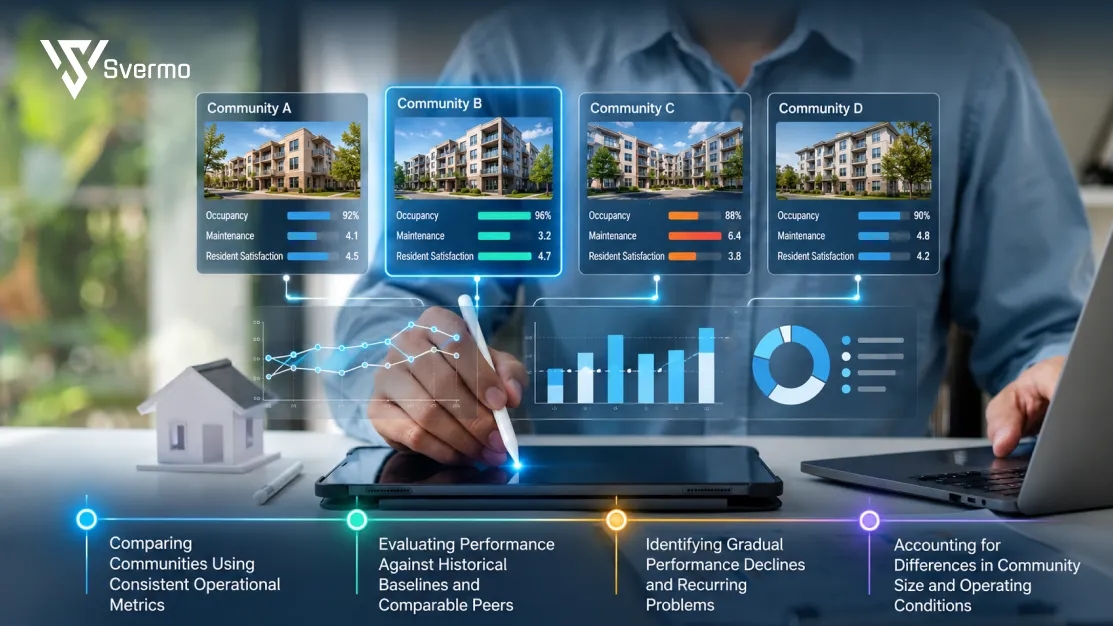
The platform compares operational measures across your communities and shows which properties are performing differently from the rest. An AI community performance monitoring platform for property managers needs to show what is driving the difference, whether it’s unusual for that property, and whether the gap is getting bigger.
One challenge regional managers frequently raise is:
“I cannot tell whether one community's slow response times are a real problem or just how that property normally runs, because there is no easy way to compare my communities side by side. I want to know how AI can show me which ones are true outliers.”
AI compares operational metrics against historical patterns and relevant peer communities to flag unusual deviations. Regional managers can investigate those outliers while accounting for differences in property size, workload, and operating conditions.
Comparing Communities Using Consistent Operational Metrics
Start with measures that mean the same thing across properties, such as overdue task rates, response times, unresolved requests, and average time to close a task. Comparing the same measures gives you a fairer view than relying on each community’s own weekly report.
For example, one property might report 20 overdue tasks and another reports 8. Looking at overdue tasks as a share of all open tasks gives you a better comparison than the raw counts alone.
Leasing performance offers another example of why consistent portfolio metrics matter. Leasing AI built by Svermo vacancy and occupancy insights, pipeline tracking, and predictive vacancy indicators. These capabilities reflect the role of AI in organizing property-level activity into comparable signals, giving regional teams a clearer basis for examining differences between communities.
Evaluating Performance Against Historical Baselines and Comparable Peers
A community’s own history gives you context for its current results. Comparing this week’s figures with previous weeks shows whether a result is normal for that property or a change worth investigating. Comparing similar communities adds another reference point.
Picture this: A community usually resolves requests within one business day, but its average has climbed to three days over the past month. Other communities remain close to their usual response times. That change stands out even if the struggling property still looks acceptable in a portfolio-wide average.
Identifying Gradual Performance Declines and Recurring Problems
Small changes are easy to miss in individual reports. Trends across several weeks reveal whether overdue work is building up, response times are slipping, or the same types of exceptions keep returning.
This is one practical application of AI-powered asset management for real estate: tracking operational patterns over time so regional managers spot gradual declines before a problem becomes the new normal.
For example, a property’s overdue task count rises slightly each week for six weeks. No single increase looks dramatic, but the steady climb points to a backlog that deserves a closer look.
Accounting for Differences in Community Size and Operating Conditions
Raw numbers don’t tell the whole story. A 400-unit community and a 150-unit community have different operating volumes, so comparing their total requests or overdue tasks alone can give a misleading result. Occupancy, seasonal demand, and the types of requests handled also affect the numbers.
Use rates and comparable groups where the data supports them. For instance, compare overdue tasks as a share of all open tasks, or compare response times among communities with similar operating conditions. If the underlying data differs too much, flag the limitation rather than presenting the ranking as a fair comparison.
The goal is to find the communities that are genuinely moving away from their normal performance, then understand what is behind the gap.
How Can You Monitor On-Site Team Performance Without Adding Reporting Work or Creating a Surveillance Culture?
Focus on whether work is moving forward, where it gets stuck, and what support the team needs. An AI platform to track on-site team activity across communities should use existing operational records rather than track every employee action or ask teams to produce extra reports.
Using Activity Already Captured in Existing Systems
Pull performance information from the property management system, task histories, and existing workflows. AI for tenant management depends on having a clear view of resident requests, response times, and unresolved issues, without asking community managers to enter the same information twice.
Example
A regional manager reviews task completion and response-time trends from existing records before a weekly operations meeting. The team doesn’t need to prepare a separate spreadsheet.
The same principle applies to resident calls. Svermo’s Voice AI product includes call analytics for tracking conversation trends and response times, alongside workflows for capturing and routing maintenance requests. This illustrates how AI product development can bring operational activity into view while keeping the focus on service patterns and workflow outcomes, rather than asking on-site teams to produce another round of reports.
Measuring Relevant Performance Indicators Without Misleading Comparisons
Choose measures that reflect the work itself. Task completion rates, time to resolution, and missed deadlines offer more context than raw activity counts. Compare similar communities and account for differences in workload before drawing conclusions about a team’s performance.
Example
A busy community processes more requests than a smaller property. Comparing resolution rates and the share of overdue tasks gives a fairer picture than comparing total tasks completed.
Using Exception Reports to Guide Focused Community Manager Check-Ins
Use performance data to set the agenda for a conversation, not to score every action an employee takes. Discuss the specific gap, hear the manager’s explanation, and agree on a clear next step.
Example
A monthly review shows that vendor approvals are holding up several jobs at one community. The regional manager and community manager discuss how to resolve the approval delays and prevent the same bottleneck from recurring.
Supporting On-Site Teams with Evidence-Based Follow-Up
Make the reason behind each concern visible and give staff a chance to correct missing context. Clear measures and consistent follow-up build trust; unexplained rankings and constant activity tracking undermine it.
Example
A work order appears overdue in the dashboard. Before raising it as a performance concern, the regional manager checks the notes and finds that the team is waiting for the resident to approve access.
Good oversight focuses on outcomes, obstacles, and support. Teams understand what is measured, managers have room to explain the context, and regional reviews stay focused on improving operations.
Can the Platform Work with Your Existing Property Management System Without Changing How On-Site Teams Work?
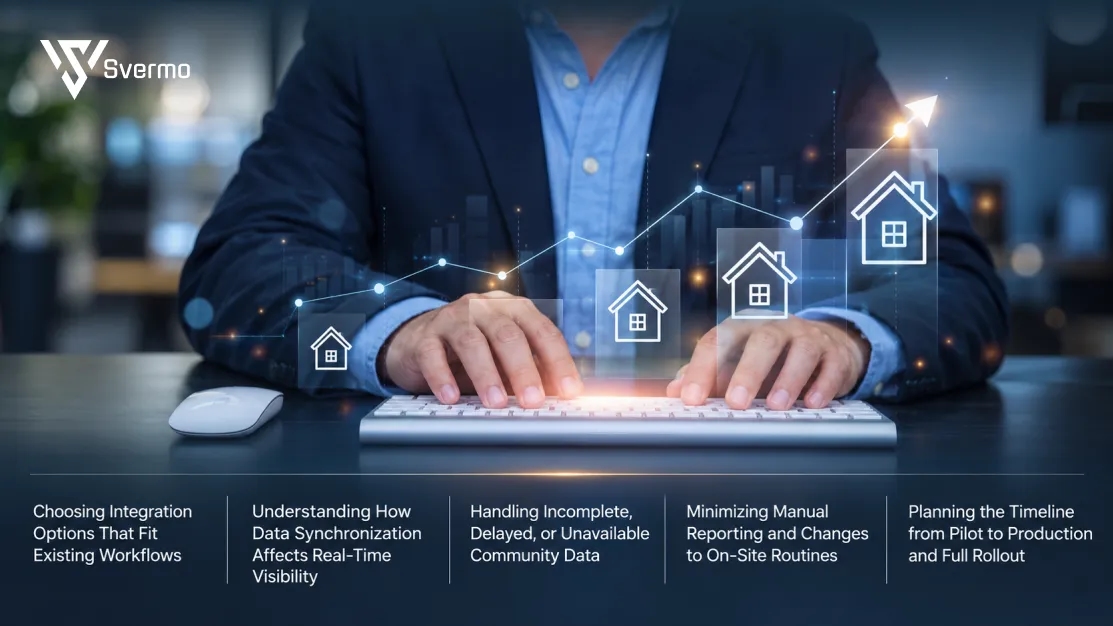
Yes, as long as the platform connects to your existing property management system and pulls the information you need. Before choosing an AI portfolio property operations platform, check what data it brings in, how often it updates, and whether your on-site teams need to do anything differently.
Choosing Integration Options That Fit Existing Workflows
Start with the property management system your teams already use. You want information from all your communities in one place, without making managers switch between tools to give you updates.
- Check that the platform works with your current system and the features your teams actually use.
- Ask whether the connection is built in, needs a third-party connector, or depends on manual file uploads.
- Find out which details come through, such as open work orders, resident requests, and task updates.
Understanding How Data Synchronization Affects Real-Time Visibility
A dashboard is only helpful if the information is current. If a work order gets updated in the morning but doesn’t show up on your dashboard until the afternoon, you’re already behind.
- Ask how often work orders, resident requests, and other records refresh.
- Check whether updates flow only into the dashboard or also back into your property management system.
- Look for a timestamp showing when the data last synced, so you know whether you’re seeing the latest updates.
Handling Incomplete, Delayed, or Unavailable Community Data
Sometimes a community’s information is missing or hasn’t updated. That doesn’t automatically mean the team has missed something. The connection itself could be the problem, and you need to know which one you’re dealing with before following up.
- Check how the platform flags missing information, failed connections, and delayed updates.
- Ask whether data gaps affect community comparisons or trigger inaccurate exception alerts.
- Find out who gets notified when a community stops sending updates and what happens next.
Minimizing Manual Reporting and Changes to On-Site Routines
Your community managers already have plenty on their plates.
An AI real estate operations automation system needs to fit into existing workflows. If community managers have to upload spreadsheets, enter the same details twice, or prepare extra reports just to keep you informed, the new platform adds another task to their day.
- Walk through a typical work order with the vendor and see what changes for the on-site team.
- Check for extra logins, duplicate data entry, manual uploads, and separate status reports.
- Ask which updates happen automatically and which ones still need someone to handle them.
Planning the Timeline from Pilot to Production and Full Rollout
Before bringing every community onto the platform, try it with a few properties first. You’ll get a better idea of how it handles your actual data and whether it fits the way your teams work.
- Choose a mix of communities with different workloads and day-to-day routines.
- Test common situations, including overdue work orders, status changes, and connection problems.
- Agree on what a successful pilot looks like, from accurate updates to less manual reporting for community managers.
Before you commit, ask the vendor to show you how the platform works with your actual property management setup. A live walkthrough gives you a much clearer picture than a standard demo.
How Can You Measure ROI Through Faster Issue Detection, Fewer Escalations, and Less Time Spent Compiling Reports?
To measure the ROI of an AI portfolio property operations platform, look at three things: time saved on reporting, faster issue resolution, and fewer recurring problems. These numbers give you a clearer picture of the value the platform brings to your communities.
Manual reporting remains a common frustration for regional managers overseeing several communities. Here is what they have to deal with:
“Every week I spend hours collecting updates from each community manager and pulling numbers from different reports just to get a clear picture of where things stand, and I want to know how AI can give me that picture without the manual compiling.”
An AI portfolio operations platform consolidates available property data into a shared view, reducing manual report compilation when the necessary integrations are in place. Regional managers can then measure the time saved against their existing reporting process.
Establishing Baseline Metrics Before Launch
Start with two or three months of existing records to understand your current performance. Track weekly reporting hours, average issue detection and resolution times, overdue work orders, and monthly escalations for each community.
Measuring Time Saved on Reporting and Status Collection
Count the hours your regional team spends chasing updates, checking spreadsheets, and preparing portfolio reports. Less time spent on these tasks means more time for community visits and operational decisions.
Example: Your team spends 8 hours a week compiling reports before rollout and three hours afterward. That’s five hours saved each week, or roughly 260 hours a year. Multiply the hours saved by your team’s hourly cost to estimate the value of that time.
Tracking Issue Detection, Resolution, and Escalation Times
Earlier alerts matter when they lead to faster action. Track these three measures to see where issues are getting stuck:
| Metric | What it tells you |
|---|---|
Issue detection time | How quickly a problem gets flagged |
Resolution time | How long it takes to fix the problem |
Escalation rate | How often an issue reaches senior leadership |
If issues get flagged sooner but still take days to resolve, the bottleneck may be in the follow-up process.
Measuring Changes in Overdue Work and Recurring Exceptions
Look for problems that keep coming back across your communities. Repeated maintenance delays, unresolved resident requests, and growing backlogs often point to issues that need attention.
Track the share of overdue work orders, repeat exceptions at individual communities, and properties with growing backlogs. Account for differences in property size and workload when reviewing the numbers.
Evaluating Results Over Realistic Measurement Windows and Accounting for Attribution Limits
One good month doesn’t tell the whole story. Staffing changes, seasonal demand, and major maintenance projects also affect results. Review several months of data before deciding how much improvement came from the platform.
When calculating ROI, include:
- Savings from reduced reporting time and lower operating costs
- Platform, implementation, and ongoing expenses
- Other changes that affected performance during the same period
Your final calculation should show whether the savings justify the cost of the AI portfolio property operations platform. Use that figure to decide whether expanding it across your portfolio makes financial sense.
What Should Regional Managers Evaluate When Choosing an AI Portfolio Operations Platform?
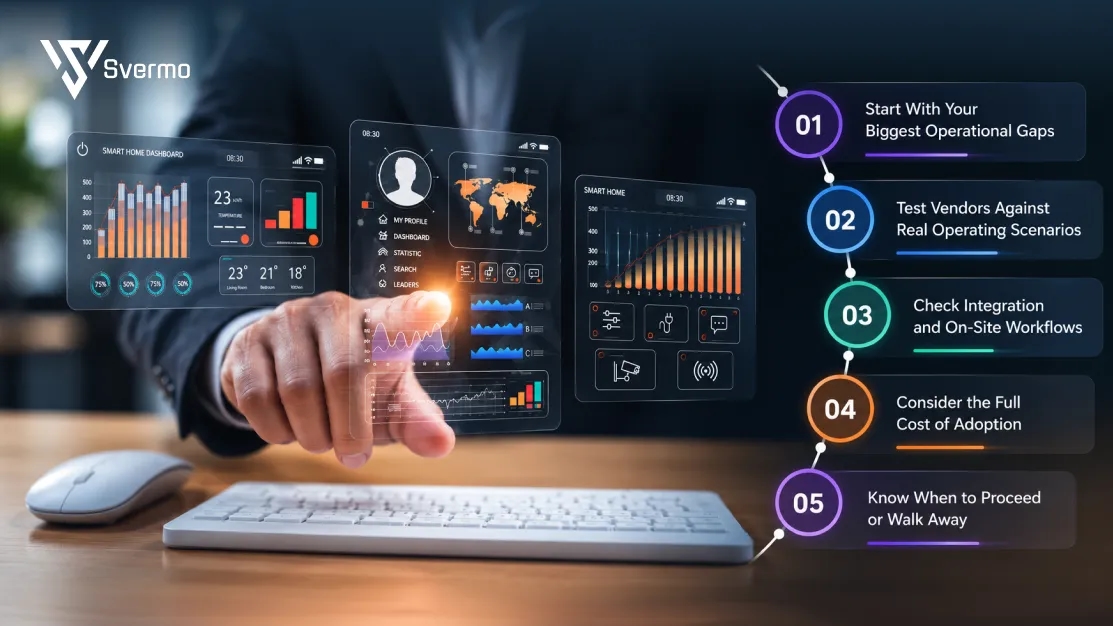
Choose an AI portfolio property operations platform by identifying your biggest operational gaps, testing vendors against real scenarios, and checking whether the expected value justifies the cost. The right choice depends on your portfolio’s needs, existing systems, and the level of visibility your regional team requires.
Start With Your Biggest Operational Gaps
Identify the problems that create the most friction across your communities.
- Late issue detection: Identify where operational problems go unnoticed until they require escalation.
- Manual reporting: Determine how much time your team spends collecting updates from community managers.
- Inconsistent community performance: Look at where differences between properties are difficult to identify or explain.
- Unreliable information: Check whether missing or delayed data affects your decisions.
Prioritize the two or three problems you want a new platform to address. This gives you a clear basis for comparing vendors.
Test Vendors Against Real Operating Scenarios
Ask each vendor to demonstrate how its platform handles a situation your regional team regularly faces. For example, two communities show an increase in unresolved resident requests. Examine how the platform surfaces the change, presents the supporting information, and gives you context for deciding what needs attention first.
For example, when evaluating vendors such as Svermo that integrate AI in real estate operations, ask them to demonstrate how their platform handles a real portfolio challenge, such as identifying unresolved resident requests across multiple communities. Focus on how clearly the platform surfaces the issue, provides supporting information, and fits your existing workflows.
Check Integration and On-Site Workflows
Confirm that the platform fits your existing property management system and the way community teams work. Ask how information is synchronized, how missing data is identified, and whether staff need to enter information more than once.
A vendor evaluation is more meaningful when community managers take part in the discussion. Their feedback reveals workflow issues that a regional dashboard demonstration alone might miss.
Consider the Full Cost of Adoption
Look beyond the subscription fee. Include implementation, training, integration, ongoing support, and the staff time required to maintain the platform.
Compare those costs with measurable opportunities, such as less time spent compiling reports, earlier identification of operational issues, and fewer recurring escalations. Apply the same criteria to Svermo and other shortlisted vendors so the final decision rests on your requirements rather than presentation quality.
Know When to Proceed or Walk Away
Proceed to a pilot when:
- The vendor addresses your highest-priority operational gaps.
- Its capabilities are demonstrated through realistic scenarios.
- Data limitations are clearly identified.
- Integration fits your existing systems and workflows.
- The expected value justifies the total cost.
Pause or walk away when:
- Essential capabilities remain unverified.
- Data behind alerts is difficult to trace.
- The setup creates substantial duplicate work.
- Implementation costs or ongoing commitments remain unclear.
- The business case relies on promises rather than measurable outcomes.
Before making a full commitment, test your preferred vendor with a representative group of communities. Agree on success measures in advance and review the results with regional and on-site managers.
The strongest choice is the vendor that understands your operational requirements, demonstrates a practical fit, and earns your confidence through evidence.
Still chasing updates instead of managing performance?
See how AI for property management brings operational signals into focus, without adding more reporting busywork.
Wrapping Up!
Managing multiple apartment communities means balancing different team priorities, property performance, and operational issues, often all at once. An AI portfolio property operations platform brings these moving parts into a clearer picture, helping regional managers focus on the communities and issues that need their attention most. Fewer status-chasing loops, more informed decisions.
Svermo brings this need into focus as a platform where real estate professionals find AI products matched to property operations challenges. For regional managers, that means a more relevant starting point for addressing portfolio visibility gaps, fragmented updates, and inconsistent follow-up across communities. The goal is simple: less time piecing together the picture and more clarity on what’s happening across the portfolio. For details on Svermo and its available AI solutions, contact us.
 https://www.linkedin.com/in/saanvi-verma-38711a36a
FAQs
AI tools that process unstructured property management data analyze text from emails, service notes, and resident messages to identify recurring topics or extract relevant details. Accuracy depends on data quality, permissions, and how well the tool handles property-specific language.
AI-based maintenance forecasting uses historical work orders, equipment records, and maintenance patterns to identify potential future needs. Predictions depend on the completeness of historical data and should support, rather than replace, inspections and professional judgment.
Property managers should review how an AI platform collects, stores, processes, and shares resident and employee information. Check access controls, data retention policies, vendor terms, and applicable privacy requirements before connecting sensitive records.
Start by checking for duplicate resident records, inconsistent property names, missing dates, and outdated work order statuses. Standardized records and clear data ownership give AI tools a more reliable foundation for analysis.
Requirements vary by platform. Regional managers should look for clear dashboards, straightforward configuration, practical training, and accessible support. Technical teams may still need to handle integrations, permissions, and more advanced setup.
Regional managers can define property-specific limits for delayed resident responses, overdue work orders, and unresolved requests. An AI portfolio property operations platform flags activity that exceeds those limits, helping teams apply consistent rules while accounting for each community’s operating requirements.
Traditional automation follows predefined rules, such as sending a reminder after a deadline. AI-based tools can also identify patterns in data, classify information, or generate recommendations, depending on the product. Many property operations platforms combine both approaches.