
AI Lead Oversight for Real Estate Teams: Track Follow-Up Consistency & Agent Accountability

Get a summary of this article with your favorite AI




AI Summary
- •Set follow-up thresholds around how your team handles new, active, and returned leads, giving AI follow-up consistency tracking for real estate teams clear rules to follow.
- •See where a lead stalled, who owned it, and what happened after each handoff with AI lead oversight for real estate teams.
- •Set workload limits, variance targets, and reassignment rules to keep workload distribution across agents visible and measurable.
- •Review the full activity trail behind an accountability flag, including timestamps, ownership changes, and recorded follow-up, before taking action.
- •Svermo’s real estate AI perspective connects lead activity, ownership, handoffs, workload signals, and exceptions into one operational workflow.
AI lead oversight for real estate teams helps answer a simple question: what is actually happening to the leads after they are handed to agents?
You may already have tools for qualifying leads and managing follow-up. The missing piece can be visibility. A team leader needs to see which leads are still waiting, who has worked them, where follow-up has stalled, and whether one agent is carrying far more leads than another.
That is where an oversight layer helps. through AI follow-up consistency tracking for real estate teams systems flag leads that have gone untouched past a set time, show the activity behind each lead, surface workload imbalances, and give leaders a clear record when an accountability flag is questioned.
Svermo's experience offering product with AI for real estate teams highlights an important point: oversight works best when it fits around the tools and workflows teams already use, rather than asking them to start over. The goal is to improve visibility without another manual tracking job.
Still Chasing Leads That Shouldn’t Need Chasing?
See where follow-up stalls, workload piles up, and ownership gets murky before the next lead slips through.
Can the Platform Flag When a Lead Has Gone Unanswered Past a Set Time, Regardless of Which Agent Owns It?
Yes. The AI platform for lead oversight checks each lead against a defined follow-up window and flags the lead when the required activity has not been recorded before that window expires. The rule follows the lead through ownership changes, so an overdue lead remains visible after reassignment.
Configurable Follow-Up Time Thresholds
The threshold sets the point at which a lead becomes overdue. Teams can define different windows for newly assigned leads, previously contacted leads, or leads returned to the queue after an unsuccessful handoff.
Two timing signals matter when setting these rules:
- Time since assignment: How long the current agent has been responsible for the lead.
- Time since qualifying activity: How long it has been since the last recorded follow-up activity.
For example, a lead assigned yesterday with a documented call today has a different follow-up status from a lead assigned yesterday with no recorded activity. This distinction makes AI follow-up consistency tracking for real estate teams more useful for day-to-day oversight.
Cross-Agent Detection of Unanswered Leads
The oversight rule applies across the entire team. When Agent A receives a lead and the required activity does not occur within the defined window, the lead enters the exception queue. If the lead moves to Agent B, the ownership history remains attached to the lead.
That history gives the team leader two useful pieces of information: who currently owns the lead and how the lead has been handled since it entered the team's workflow.
For stalled lead detection, this prevents reassignment from resetting the context around an overdue lead. The new agent receives the lead with its previous activity and ownership history available for review.
Escalation for Leads That Exceed the Threshold
Once a lead crosses the defined threshold, the platform routes the exception according to the team's rules. An overdue lead might appear in a manager's exception queue, trigger an alert, or enter a reassignment workflow when the assigned agent is unavailable.
The escalation record also gives the leader a reason for the alert: the lead reached the configured threshold without the required activity. That creates a clear starting point for deciding whether the lead needs immediate intervention, reassignment, or routine follow-up from the current agent.
How Does AI Give a Team Leader a Single View of Follow-Up Activity Across Every Agent?

AI gives a team leader one place to see lead ownership, follow-up activity, current status, and exceptions across the entire team. An AI dashboard for real estate team follow-up visibility brings these details together instead of separating them across individual agent records.
A common question among real estate team leaders is:
“My agents generate plenty of leads, but when I check in on follow-up, some agents are thorough and others barely respond, and I have no consistent way to see this across the whole team. I want to understand how AI can give me visibility into this instead of relying on spot checks.”
AI brings lead ownership, recorded activity, follow-up status, and exceptions into one team-level view. The dashboard shows which leads are active, awaiting follow-up, overdue, or escalated across every agent.
Centralized Visibility into Lead Ownership and Activity
The team-level view connects every lead to its current owner, latest recorded activity, follow-up status, and ownership history.
For example, a lead record might show:
Current owner: Agent 14
Last activity: Email recorded Tuesday at 2:15 PM
Follow-up status: Overdue
Previous owner: Agent 07
Ownership change: Tuesday at 9:40 AM
That level of detail gives team leaders agent performance visibility for real estate teams without relying on separate updates from each agent.
Team-Wide Follow-Up Status
Instead of opening every lead record, the team leader starts with the overall distribution of lead status:
- Active: Follow-up activity is within the defined team rules.
- Awaiting follow-up: The next required action has not been recorded.
- Overdue: The defined follow-up threshold has passed.
- Escalated: The lead has moved into a manager review or reassignment workflow.
The same status rules apply across the team, creating a consistent view of follow-up activity.
Activity Patterns Across Agents
The dashboard also shows patterns that individual lead records do not reveal on their own.
For instance, repeated overdue leads within one agent's workload point to a different issue from occasional overdue leads spread evenly across the team. A concentration of stalled leads after reassignment points to another workflow issue.
This is where real estate team activity reporting becomes useful for management. The data connects individual lead activity with broader patterns in follow-up consistency and lead handling.
Can the Platform Redistribute Leads Automatically When an Agent Is Unavailable or Overloaded?
Yes. Lead redistribution follows defined workload and availability rules. When an agent becomes unavailable or reaches a configured workload limit, eligible leads move through the team's reassignment workflow.
Target audience often ask queries such as:
“I spend hours every week manually trying to figure out which leads have gone cold because nobody followed up, and I want to know how AI can flag these automatically instead of me finding out weeks later.”
The platform checks each lead against its defined follow-up window. When the required activity is missing after that window, the lead enters the exception workflow, regardless of its current owner.
Agent Workload and Capacity Signals
Workload assessment uses current assignments, pending follow-ups, overdue leads, and other activity signals recorded against each agent.
For example, an agent with 40 active leads and several overdue follow-ups has a different workload profile from an agent with 15 active leads and no overdue activity. An AI workload balancing tool for real estate agents uses these workload signals to identify capacity differences across the team.
Availability status adds another input. An agent marked unavailable is handled differently from an active agent who has reached a workload threshold.
Availability-Based Reassignment
When the defined reassignment condition is met, eligible leads move to another agent according to the team's routing rules. The lead retains its existing activity and ownership history during the transfer.
The receiving agent therefore gets the previous follow-up record, current status, and ownership changes with the reassigned lead. This keeps the handoff tied to the lead's full history.
For teams focused on workload distribution across agents, reassignment rules also define which leads qualify for transfer and which situations require manager review.
How Does the Platform Work Alongside Our Existing Lead Qualification or Follow-Up Tools Instead of Replacing Them?
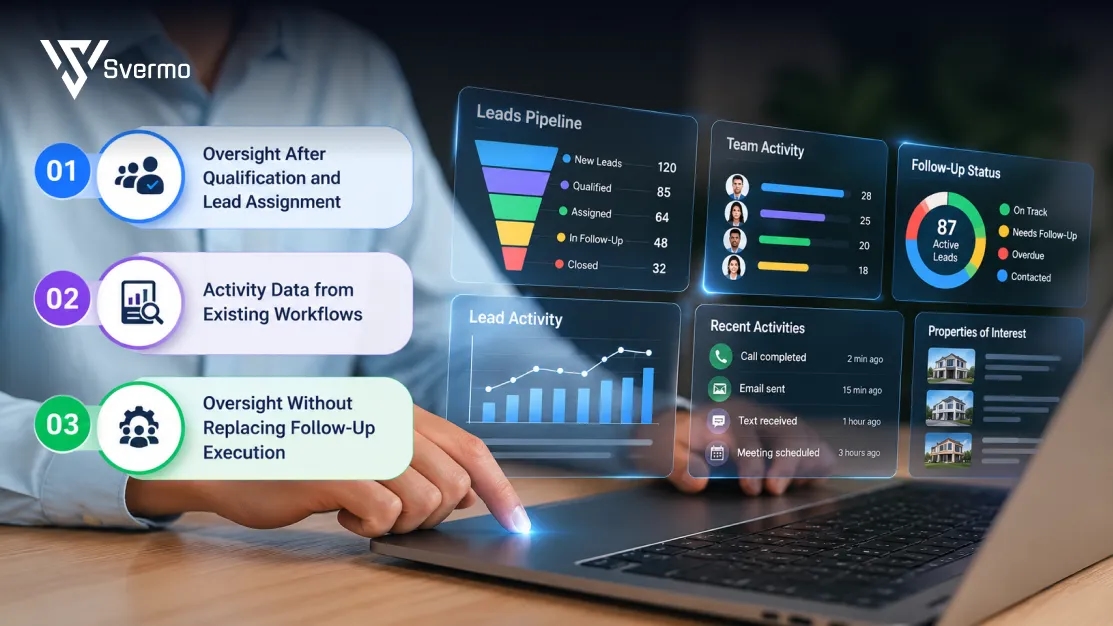
The oversight layer works alongside a real estate AI lead qualification platform and existing follow-up tools by reading the activity those systems already record and applying team-level oversight rules to it.
A common question for teams that already have qualification and routing tools resembles this query:
“We already use tools to qualify and route our leads, but I still have no way to tell if my agents are following through once a lead reaches them, so I am trying to understand whether a separate oversight layer would actually close that gap.”
The oversight layer reads existing lead activity and applies team-level rules to it. Qualification and follow-up remain in the existing systems, while oversight tracks whether assigned leads receive the required attention.
Oversight After Qualification and Lead Assignment
Once qualification and routing are complete, oversight starts with the assigned lead. The platform tracks the lead's owner, assignment time, subsequent activity, and follow-up status against the team's defined rules.
- Operational example: A buyer lead is qualified and assigned to Agent 12 at 10:00 AM. The oversight rule requires activity within two hours. At 12:00 PM, no qualifying activity is recorded, so the lead enters the overdue queue for the team leader.
Activity Data from Existing Workflows
The oversight layer uses recorded events from the AI real estate lead follow-up platform to build the activity record. The relevant events include lead assignment, reassignment, calls, emails, messages, notes, completed tasks, and status changes.
- Operational example: Agent 12 calls a lead at 11:20 AM and records the call in the existing follow-up system. That event updates the lead's activity history and removes the lead from the "no activity" exception when it satisfies the team's follow-up rule.
This approach also shows up in Svermo’s property-management AI work. Its Voice AI workflow connects with CRM and property-management systems, while recording calls, routing requests, and reporting on activity. The same principle applies here: AI sits around the existing workflow and creates a clearer record of what happened.
Oversight Without Replacing Follow-Up Execution
Agents continue working their assigned follow-up tasks in the existing system. The oversight layer handles the management view, including overdue exceptions, activity reporting, accountability records, and workload signals.
- Operational example: An agent completes follow-up tasks in the team's existing platform throughout the day. The team leader opens the oversight dashboard at 4:00 PM and sees 6 overdue leads across the team, the current owners, the last recorded activity, and the leads requiring review.
For teams building an AI oversight layer for real estate lead management, the practical setup keeps execution with the existing tools and adds a separate layer for team-wide visibility and control.
How Can a Real Estate Team Implement an AI Lead Oversight Layer?

A real estate team implements an AI lead oversight platform by defining follow-up rules, connecting lead activity data, setting ownership and escalation logic, and testing the workflow with a controlled group before expanding it across the team. The implementation starts with the team's existing lead-handling process, so agents do not have to maintain a separate tracking workflow.
Follow-Up Rules and Escalation Thresholds
The first step is defining what counts as a missed follow-up and when it becomes an exception. Clear rules create consistent follow-up accountability automation across the team's lead workflow.
- New lead: Flag when no qualifying activity is recorded within the team's defined response window.
- Existing lead: Start the next follow-up window from the most recent qualifying activity.
- Overdue lead: Escalate after the configured threshold expires.
- Repeated exception: Send recurring follow-up gaps into a management review workflow.
Required Lead and Activity Data Sources
The oversight layer needs enough information to reconstruct each lead's journey. The exact data depends on the systems already used for qualification, routing, and follow-up.
- Lead ID and current owner
- Assignment and reassignment timestamps
- Calls, emails, messages, notes, and task events
- Completion timestamps for follow-up actions
- Agent availability or working-status data
- Current lead status and escalation state
These records provide the foundation for real estate team activity reporting, giving leaders a consistent view of what happened to each lead.
Ownership, Availability, and Reassignment Rules
Ownership rules define who is responsible for a lead at each stage. Availability and capacity rules determine when a lead enters a reassignment workflow. Together, these rules support workload distribution across agents while keeping ownership changes traceable.
- Ownership: Record the responsible agent at each stage.
- Availability: Record periods when an agent cannot receive or work new leads.
- Capacity: Set workload conditions that trigger review or reassignment.
- Handoff: Preserve previous ownership and activity when a lead moves to another agent.
A Controlled Pilot Before Broader Team Rollout
A pilot tests the oversight rules against real lead activity before the workflow expands across the team. One defined team, territory, or lead source provides enough activity to test alert accuracy, data completeness, escalation paths, and reporting.
- Select a defined group of agents or lead source.
- Review flagged leads against their underlying activity records.
- Record false flags, missed exceptions, and unclear ownership cases.
- Adjust thresholds and escalation rules based on the findings.
The pilot establishes the operating rules before wider deployment and provides a baseline for ongoing lead handling transparency.
Svermo's Leasing AI work follows the same workflow-first thinking. The system covers inquiry capture, prospect qualification, tour scheduling, applications, and lease conversion as connected steps. That kind of workflow mapping matters before deciding which events an oversight layer needs to track.
What Happens When an Agent Disputes Being Flagged as Inconsistent, Does the Data Show the Full History?
Yes. A defensible accountability flag needs the lead's full activity and ownership history behind it. The record shows what happened before the flag, which agent owned the lead at each point, and which activity was recorded against the lead.
Team leaders also ask:
“I do not fully trust a system that tells me "leads are being handled" if I cannot see which leads were actually touched, by whom, and when, so I need something that shows the full activity history, not just a summary.”
The activity history shows ownership, timestamps, calls, emails, messages, tasks, status changes, and escalation events. That record provides the evidence behind the flag rather than relying on a summary status.
Complete Lead Activity and Ownership Records
The history follows the lead through assignment, follow-up, reassignment, and escalation. Each recorded event adds context to the lead's timeline.
A useful audit trail includes:
- Assignment and reassignment timestamps
- Agent ownership at each stage
- Recorded calls, emails, messages, notes, and tasks
- Completion or activity timestamps
- Follow-up status changes
- Escalation events and their timestamps
This level of lead handling transparency gives the team a factual record to review when an accountability decision is questioned.
Evidence Supporting Accountability Flags
An accountability flag needs a clear connection between the rule and the activity record. The review starts with the threshold that was applied, the time it expired, and the activity recorded before and after that point.
For example, a lead flagged after 24 hours without qualifying activity would show the assignment time, the 24-hour threshold, the last recorded activity, and the time the exception was created. That evidence separates a missed follow-up from a flag caused by incomplete or incorrectly recorded data.
Context for Ownership Changes and Legitimate Exceptions
Ownership history matters when a lead changes hands during the review period. The record identifies when the original agent stopped being responsible and when the next agent took ownership. Legitimate exceptions also need a place in the record. An agent marked unavailable, a manager-directed reassignment, or a documented customer-requested delay changes the context around a follow-up gap.
The result is a clearer AI accountability dashboard for real estate team leaders, where accountability decisions are tied to the lead record rather than a summary score alone.
How Can I Measure ROI Through Fewer Stalled Leads, More Even Workload Distribution, and Improved Team-Wide Response Consistency?
Measure ROI through four operating metrics: fewer overdue leads, tighter workload distribution, stronger follow-up consistency, and less manual oversight time.
Reduction in Leads Exceeding Follow-Up Thresholds
Track:
- Overdue leads per week
- Average overdue duration
- Repeat overdue instances
- Overdue leads resolved after escalation
Improvement in Workload Distribution
Set a workload range and a variance target before rollout.
For example:
- Target active leads per agent: 30 to 40
- Maximum active leads: 45
- Overdue lead threshold: 3 per agent
- Workload variance target: no more than 15% above or below the team average
- Reassignment trigger: more than 45 active leads or more than 3 overdue leads
Track active leads, pending follow-ups, overdue leads, new assignments, and reassignments against these thresholds. This gives workload distribution across agents a measurable baseline.
Improvement in Team-Wide Follow-Up Consistency
Track:
- Follow-ups completed within the required window
- Follow-up compliance rate
- Exceptions per agent
- Repeat exceptions
Set a target such as 95% of assigned leads receiving required follow-up within the defined window.
Reduction in Manual Oversight Effort
Track weekly hours spent finding stalled leads, reviewing activity, checking ownership changes, and preparing reports. Set a target reduction against the pre-implementation baseline.
These thresholds turn stalled lead detection, workload balance, and follow-up consistency into measurable operating targets.
How to Choose an AI Accountability Platform as a Real Estate Team Leader?
When comparing the best AI platforms for real estate agents for-lead oversight, the easiest test is to put them through real team situations. What happens when a lead goes overdue? What happens when ownership changes? What happens when one agent has 45 leads and another has 25? Those answers tell you more than a feature list.
See What Happens When a Lead Goes Overdue
Take a sample lead and set a follow-up deadline. Check the deadline, last activity, current owner, and what happens after the exception is raised. This is a core test for AI follow-up consistency tracking for real estate teams.
Check the History When Ownership Changes
Move a lead from one agent to another and review the timeline. The record needs to show who owned the lead at each stage and which agent completed each follow-up.
Check How Workload Imbalance Is Handled
Set a limit, such as 40 active leads per agent. Then test what happens when one agent reaches 45 while another has 25. Review the reassignment rule and resulting workload distribution across agents. This is a key test for an AI workload balancing tool for real estate agents.
Recreate a Disputed Flag
Take an overdue lead and work backward from the accountability flag. The record should show the rule, timestamps, activity, ownership changes, and reason for the flag. This level of detail matters in an AI lead oversight platform for real estate brokerages.
The same principle applies to one of the AI workflows Svermo has built. In Deal AI , information from offering memorandums, rent rolls, financial statements, and supporting documents is brought together before an insight is produced. The lesson is simple: an AI output carries more weight when the underlying evidence stays visible.
Compare the Numbers Before and After
Track overdue leads, follow-up compliance, workload variance, reassignment volume, and time spent on manual reviews. These numbers show whether the oversight process is changing day-to-day team management.
Svermo’s work in real estate AI has shaped one practical view of oversight: the important details sit in the activity trail. Ownership, timestamps, follow-up events, rule thresholds, and handoffs provide the context behind an accountability flag.
Wondering Where Your Lead Workflow Actually Breaks?
Walk through your current process and spot the gaps hiding between assignment, follow-up, and handoff.
Wrapping It Up!
The real test for AI lead oversight for real estate teams is simple: when a lead goes quiet, can you see exactly when follow-up stopped, who owned it, how long it sat, and what happened next? Add workload thresholds and ownership history, and the conversation moves from “Who dropped this lead?” to “Where did the workflow break?”
That is the thinking behind Svermo’s approach to real estate AI: connect the dots between lead activity, agent ownership, follow-up gaps, and team workload rather than treating each event as a separate data point. Want to see what that looks like against your current workflow? Give us a call and walk us through how your team handles leads today.
 https://www.linkedin.com/in/saanvi-verma-38711a36a
FAQs
An AI lead oversight platform for real estate brokerages needs reliable lead, agent, ownership, activity, and status data. Consistent timestamps and standardized activity records matter because incomplete data produces incomplete oversight.
The best approach is to position AI accountability for real estate agent follow-up as a workflow review tool rather than a surveillance system. Agents need clear visibility into what is being measured, which events trigger review, and how exceptions are handled.
Set clear data-access rules, limit visibility to information required for team oversight, define retention periods, and document who reviews agent activity. Privacy requirements also depend on the brokerage's location, systems, and applicable regulations.
An AI follow-up consistency tracking system needs a process for correcting inaccurate records. Managers should distinguish between a genuine follow-up gap and an exception caused by missing, delayed, or incorrectly logged activity.
Review frequency depends on lead volume and workflow speed. High-volume teams often need frequent exception reviews, while broader performance reporting works well on a weekly or monthly cadence. The important point is separating immediate exceptions from longer-term trends.
Yes, when the reporting is tied to specific workflow patterns. An AI accountability dashboard for real estate team leaders gives managers a factual starting point for coaching conversations around recurring process gaps, workload habits, or handoff issues.
Ask how the system handles data accuracy, permissions, audit records, rule changes, exceptions, and historical records. Also ask for a real workflow demonstration using a scenario from your brokerage. That reveals more than a standard product demo.