
AI Homebuilder Operations Platform: Automate Buyer Coordination, Property Handoffs & Post-Sale Operations Across Communities


Get a summary of this article with your favorite AI





AI Summary
- •AI homebuilder operations platforms coordinate buyer communication, closing milestones, outstanding documents, and next steps.
- •AI buyer coordination for homebuilders keeps closing-date updates, document reminders, and buyer commitments connected across teams.
- •AI homebuilder automation maintains shared home and buyer records across sales, closing, and customer care.
- •AI post-closing customer care for homebuilders supports routine homeowner questions, service request intake, and clear status updates across communities.
- •Svermo’s approach to AI operations includes Voice AI for homeowner calls, capturing relevant details and connecting conversations with the right homeowner records for follow-up.
From the first contract to the questions that come in after closing, homebuilders deal with a steady flow of buyer updates, team handoffs, and homeowner requests.
An AI homebuilder operations platform brings these tasks into one connected workflow. It tracks missing buyer documents, sends updates when closing dates change, and passes key details from sales to closing to customer care. After closing, it shares appliance information and maintenance guidance, records service requests from phone, text, and email, and keeps homeowners updated on their status.
The key is how well the platform works with your existing systems. An AI system for homebuilders connects with your CRM and homeowner records, keeps information consistent across teams, and flags conflicting details or questions that need human attention.
As a U.S.-based AI product company, Svermo works at the intersection of AI and day-to-day business operations. In homebuilding, the important detail is the handoff itself: buyer commitments, closing updates, and home records need to stay connected as responsibility moves from sales to closing to customer care.
Still chasing updates instead of building homes?
Connect buyer coordination, closing handoffs, and homeowner care with AI built for homebuilder operations.
How Does AI Coordinate Buyers from Contract to Closing?
An AI homebuilder operations platform connects buyer communication with closing milestones, outstanding documents, and next steps. It keeps the buyer’s status visible to the team and ties each update to the correct closing record.
Track Closing Milestones, Documents, and Buyer Next Steps
Suppose a buyer is two weeks from closing, but their lender approval letter is still missing. The system marks the document as outstanding, sends a reminder with submission instructions, and keeps the pending item visible until the closing record is updated. The team sees what remains without checking separate email threads.
Reducing manual document follow-up is a recurring operational concern for homebuilder closing teams.
“We spend hours chasing buyers for missing lender and title documents, and buyers keep asking what is still outstanding, which delays closings when a request sits unanswered. What would it take for AI to track what is outstanding and remind each buyer?”
AI tracks required lender and title documents, identifies outstanding items, and sends buyers reminders with submission instructions. The closing record keeps pending documents visible to the team.
Send Updates When Closing Dates or Requirements Change
If the closing team confirms that a buyer’s closing date has moved from Friday to Monday, the buyer communication platform sends the revised date and updates related reminders. The buyer receives the confirmed change in time to adjust their plans, rather than relying on an earlier message.
Homebuilders regularly raise questions about keeping buyers informed throughout the closing process.
“We have buyers who hear one closing date from our sales team, another from their lender, and a vague answer from someone else, and by the time a date change reaches them they have already arranged movers and time off. How much of that updating could AI handle?”
AI sends updates when a confirmed closing date changes, adjusts related reminders, and flags conflicting dates for review. Connected closing records keep buyer communications aligned with the latest verified information.
Verify Closing Details and Flag Conflicts
Suppose a buyer asks why one email lists October 20 while another lists October 18. The system checks the connected closing record and flags the mismatch for review. It doesn’t choose a date on its own or send an unconfirmed answer.
Answer Routine Questions and Route Exceptions
When a buyer asks, “Which documents are we still waiting for?”, AI checks that buyer’s record and names the outstanding items rather than sending a generic checklist. If the buyer questions a lender requirement or asks for an exception to a closing deadline, AI forwards the conversation and relevant history to the closing team for review.
How Can AI Automate Homeowner Communication and Service Request Intake After Closing?
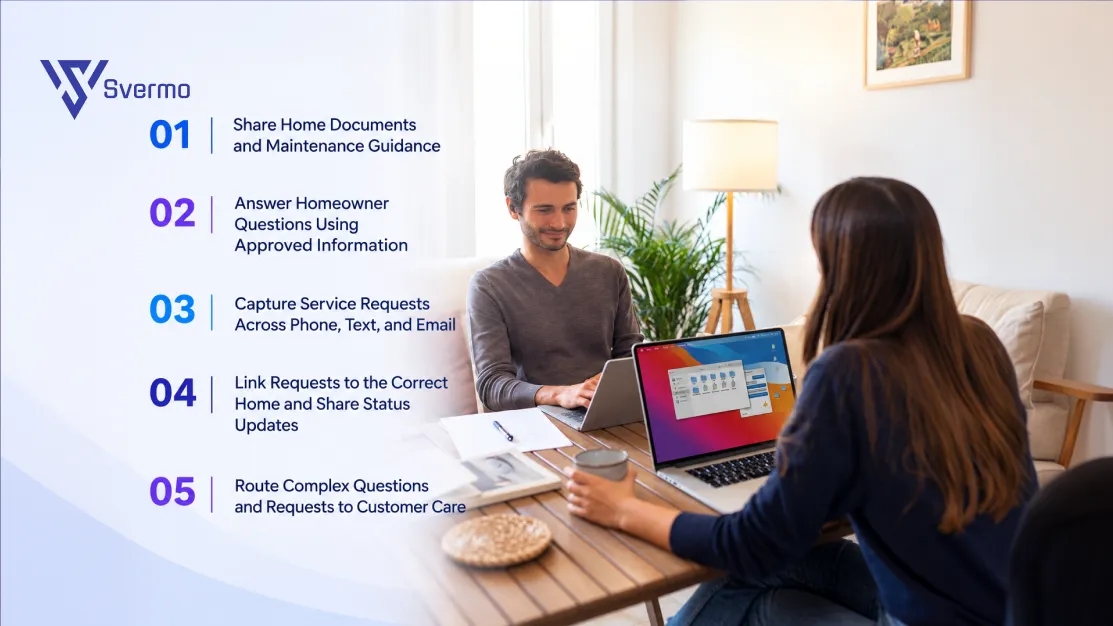
An AI homeowner communication platform for homebuilders connects post-closing conversations with each home’s records, approved documents, and open service requests. It handles routine communication and passes cases requiring a decision to customer care.
Share Home Documents and Maintenance Guidance
An AI document management tool organizes access to home-specific information, including installed appliance models, manufacturer manuals, care instructions, and documents provided at closing. When a homeowner asks how to clean their HVAC filter, the response follows the guidance on file for that home.
Homebuilders gain:
- Fewer calls asking for appliance details already recorded
- Less staff time spent locating closing documents
- More consistent guidance across communities
Answer Homeowner Questions Using Approved Information
An AI resident communication system connects homeowner questions with builder-approved warranty documents, maintenance guidance, and customer care policies to provide consistent answers after closing.
If a homeowner asks whether a loose bathroom tile qualifies for warranty coverage, AI shares the documented process for raising the concern and sends unclear coverage questions to customer care.
This gives customer care:
- Fewer routine questions to answer manually
- Clear boundaries around warranty-related responses
- A record of the information shared with each homeowner
Capture Service Requests Across Phone, Text, and Email
AI homeowner service request intake for homebuilders turns homeowner messages into structured records, capturing the affected area, reported issue, date noticed, and supporting details. If a homeowner emails that water appears around a bedroom window after heavy rain, AI records the description and asks for missing details, such as when the leak occurs.
The intake process delivers:
- More complete details for the first customer care review
- Fewer clarification calls caused by vague descriptions
- A consistent record of requests received through different channels
Link Requests to the Correct Home and Share Status Updates
AI uses homeowner details, property records, and request history to associate follow-up messages with the existing request. Status updates reflect the latest recorded stage, such as awaiting additional information or pending customer care review.
For homebuilders, this means:
- Fewer duplicate requests when homeowners follow up through another channel
- A clearer history of communication about each reported issue
- Less manual effort answering repeated status questions
Route Complex Questions and Requests to Customer Care
AI flags cases involving conflicting records, unclear warranty information, complaints, or decisions outside approved response rules. It passes the original message, relevant home details, prior responses, and collected answers to customer care.
Customer care receives:
- The context needed to review the issue without reconstructing the conversation
- Clear visibility into why the request was escalated
- A more reliable record of how homeowner concerns were handled
How Can AI Maintain One Shared Record for Each Home and Buyer Across Team Handoffs?
An AI homebuilder platform connects buyer details, home information, sales commitments, documents, and communication history in one shared record. Sales, closing, and customer care work from the same information, with relevant context carried forward as responsibility changes hands.
Bring Buyer Details, Home Information, and Communication History Together
A shared record links each buyer to their specific home, contract details, closing status, key documents, and past conversations. This is the core of AI to keep one record for each home and buyer: teams see the same history without piecing together information from separate spreadsheets, emails, and systems.
Example: A community has two buyers with similar names and closing dates. Their records link each buyer to the correct home address, contract, contact details, and closing status, reducing the risk of attaching a document or note to the wrong buyer.
Consistent information across sales, closing, and customer care remains a common priority for homebuilders. Understand it with this query:
“We pass buyers from sales to closing to customer care, and the handoff notes are often incomplete, so the next team asks the buyer to repeat what they already told us or does not know what was promised during the sale. I want to know how AI can keep one record for each home and buyer that every team works from.”
AI brings buyer details, sales commitments, documents, and communication history into one shared record. Each team sees recorded commitments, open questions, and relevant updates as responsibility changes hands.
Transfer Sales Commitments and Buyer Context Across Teams
AI to hand off buyer information between sales, closing, and customer care preserves relevant commitments, preferences, and unresolved questions as responsibility moves between teams.
Example: A sales representative records a commitment to provide a particular appliance model and notes that the buyer requested confirmation before closing. The commitment stays attached to the buyer’s record, giving closing and customer care visibility into what was discussed and what remains unresolved.
Carry Home Records into Post-Closing Care
After closing, relevant buyer and home information remains connected to the homeowner’s record. Applicable documents, appliance details, maintenance guidance, and previous interactions stay available to customer care, preserving the home’s history beyond the closing date.
Example: Six months after closing, a homeowner contacts customer care with a question about their original purchase. The team reviews the retained home records and earlier sales notes instead of asking the homeowner to reconstruct the details from old emails.
Keep Records Consistent Across Connected Systems
AI property operations for homebuilders connects the CRM, closing records, and homeowner records through defined data-sync rules. These rules identify where updates originate and which fields are shared, while conflicting or incomplete records are flagged for review.
Example: After a buyer’s contact details change in the CRM, the configured integration updates the corresponding closing and homeowner records. Staff no longer need to enter the same change separately in each system, and the update remains linked to the correct buyer and home.
How Do Homebuilders Integrate and Validate an AI Operations Platform?
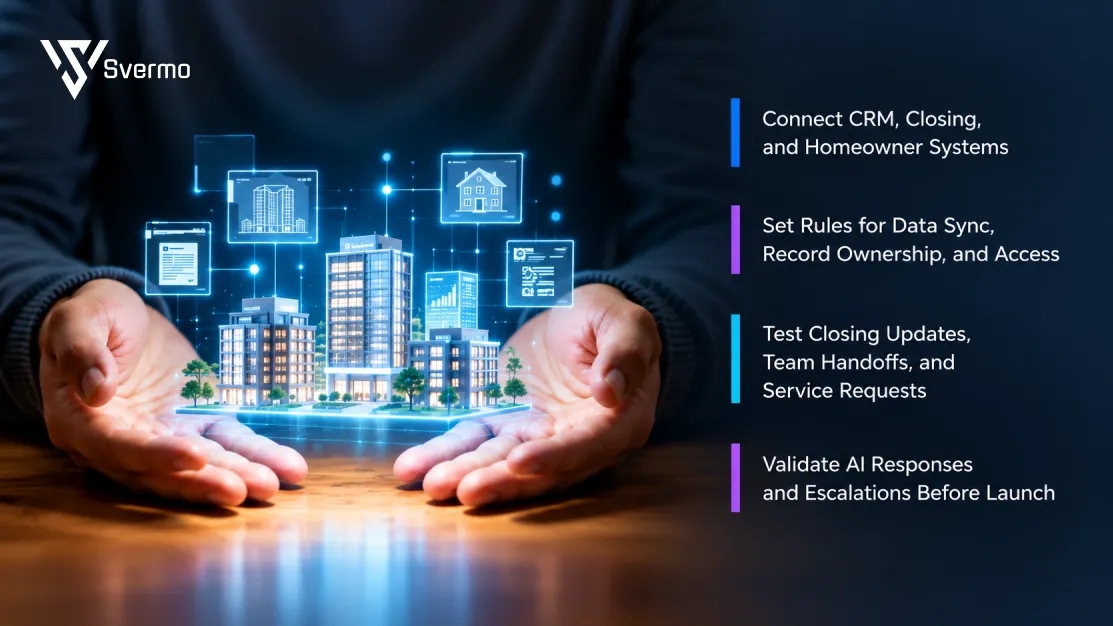
An AI operations platform for homebuilders in United States connects your CRM, closing system, and homeowner records so information stays connected from contract to closing and into post-closing customer care.
The goal is simple: each team gets the right information when responsibility passes from sales to closing and then to customer care.
Connect CRM, Closing, and Homeowner Systems
When considering how to integrate AI automation with real estate workflows, start by identifying where your team stores buyer contact details, closing dates, contract information, and home records. Connect those systems so the AI platform uses the right information for each buyer and home.
Check that:
- Buyer details match the correct home and records
- Confirmed closing-date changes reach the right communication workflow
- Homeowner records stay linked to the correct property
- The platform works with your existing CRM and homeowner systems
Set Rules for Data Sync, Record Ownership, and Access
Decide which system is responsible for each piece of information. For example, the CRM holds buyer contact details, the closing system owns confirmed closing dates, and homeowner records keep post-closing conversations and service request history. The AI platform follows these rules when reading or updating information.
If the CRM shows a different closing date from the closing system, the mismatch goes for review instead of being changed automatically.
Before launch, agree on:
- Field ownership: Which system controls each detail
- Sync rules: Which updates move between systems and in which direction
- Conflict handling: What happens when dates or records don't match
- Access permissions: Which teams can view or change buyer and homeowner information
- Change history: Where teams check when a detail changed and which system supplied it
Test Closing Updates, Team Handoffs, and Service Requests
Run through everyday situations before putting the platform into use. Test a changed closing date, a buyer moving from sales to closing, and a homeowner following up on an existing service request. Check that each update reaches the right record and the next team has the information it needs.
Make sure that:
- Buyers receive the correct update when a closing date changes
- Sales commitments and open questions stay attached during team handoffs
- Homeowner follow-ups connect to the existing service request
- Failed updates and duplicate records are flagged for review
Validate AI Responses and Escalations Before Launch
Test the AI with real homeowner questions and approved builder documents. Include cases where information is missing, warranty wording is unclear, or a question needs a customer care representative to make a decision.
Before launch, check that:
- Answers match the builder's approved information
- Unconfirmed closing details aren't presented as final
- Unclear warranty questions go to customer care
- Escalated conversations include the original message and relevant home details
How Can Homebuilders Measure the Results of AI Operations Automation?
Measure an AI homebuilder operations platform against baseline performance in buyer follow-ups, closing updates, record accuracy, and homeowner service requests. For AI homebuilder automation, track results before and after launch to identify improvements and workflows that need attention.
Measure Time Saved on Follow-Ups and First Response Times
Track staff time spent following up on outstanding buyer documents, first response times, and manual follow-up tasks. These measures show how effectively AI buyer coordination for homebuilders supports contract-to-closing communication and keeps outstanding items visible.
Track Closing Updates and Service Request Status
Measure whether confirmed closing changes reach buyers and homeowner requests display accurate, current statuses. These checks evaluateAI homeowner service request intake closing coordination for homebuilders across communities.
| Metric | What to check |
|---|---|
Closing update accuracy | Buyers receive the confirmed closing date |
Request status accuracy | Records reflect the latest known status |
Update delays | Time between a recorded change and the related update |
Assess Record Accuracy, Handoffs, and Escalation Quality
Review sales-to-closing handoffs and customer care escalations to confirm that buyer commitments, property details, and communication history reach the correct team. This measures how well AI to hand off buyer information between sales, closing, and customer care preserves context across the buyer-to-homeowner journey.
| Handoff measure | What to check |
|---|---|
Buyer commitment transfer | Recorded commitments and unresolved questions are included |
Record accuracy | Information is linked to the correct buyer and home |
Context completeness | Relevant messages and documents are available to the receiving team |
Escalation quality | Customer care receives issue details and available history |
Track each measure against your pre-launch baseline, document recurring errors, and set targets based on your builder’s operational requirements. The NIST AI Risk Management Framework provides guidance on documenting, evaluating, and monitoring AI system performance.
Compare Results with Baselines Before Expanding Automation
As homebuilders expand AI for property management across more communities, track response times, homeowner record accuracy, and team handoffs against your standards.
What Should Homebuilders Compare When Evaluating AI Operations Platforms?
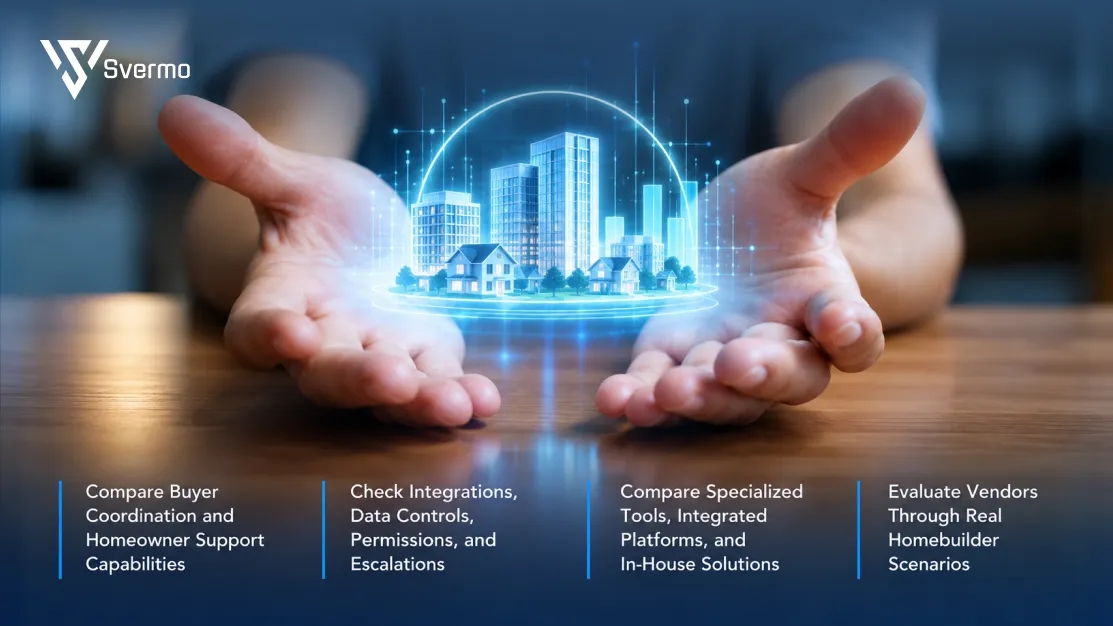
When evaluating an AI homebuilder platform, compare how each option handles buyer coordination, closing updates, team handoffs, and post-closing homeowner support. Check its integrations, data controls, and performance in real homebuilder workflows before choosing a solution.
Compare Buyer Coordination and Homeowner Support Capabilities
Check how each platform tracks outstanding buyer documents, shares confirmed closing updates, and carries buyer information from sales to closing. For post-closing care, review how it answers homeowner questions using approved information, captures service requests, and shares status updates.
A strong fit covers the workflows your teams need across the buyer-to-homeowner journey. Assess AI buyer communication platforms for homebuilders and homeowner support capabilities against the same requirements.
Check Integrations, Data Controls, Permissions, and Escalations
Confirm that the platform connects with your existing CRM, closing system, and homeowner records. Ask which system controls each field, how updates sync, and how the platform flags conflicting or missing information.
Also check:
- Data access: Which teams can view buyer documents and homeowner records?
- Record history: Can staff trace changes to key details?
- Escalations: Does customer care receive the original question and relevant context?
- AI response controls: Are answers grounded in approved builder information, with unclear warranty questions routed for review?
For builders looking for an AI homebuilder platform that works with my CRM and homeowner records, integration details and record ownership deserve close review.
Compare Specialized Tools, Integrated Platforms, and In-House Solutions
Specialized tools focus on a defined workflow, such as buyer communication or homeowner service request intake. Integrated platforms connect several workflows through shared records and coordinated handoffs. In-house solutions give the builder greater control over workflow design and maintenance, with development and ongoing support managed internally.
| Approach | Best fit to evaluate | Main consideration |
|---|---|---|
Specialized tool | A specific workflow with a clear need | Data sharing across other systems |
Integrated platform | Connected buyer, closing, and homeowner workflows | Integration coverage and configuration |
In-house solution | Requirements that existing products do not meet | Internal development, testing, and maintenance |
Compare each approach against your current systems, team capacity, and required workflows.
Evaluate Vendors Through Real Homebuilder Scenarios
Ask each vendor to demonstrate the same scenarios using representative records and clear success criteria.
- Closing date change: Update a confirmed closing date and check that the correct buyer receives the revised information.
- Sales-to-closing handoff: Record an unresolved buyer question and confirm that closing receives the original context.
- Homeowner service request: Submit a request by email, then follow up by text. Check that both messages link to the correct home and request.
- Warranty question: Ask about a situation the approved documents do not clearly cover. Confirm that the platform avoids unsupported promises and routes the question to customer care.
- Record conflict: Change a buyer detail in one connected system and check how the platform handles the mismatch.
Use the same scenarios to compare vendors on accuracy, record updates, response quality, and escalation handling. This gives your team a practical basis for evaluating AI systems for homebuilders against actual operating requirements.
For homebuilders evaluating Voice AI agent from Svermo, focus on how it handles real homeowner calls: understanding the issue described, capturing key details, and recognizing when customer care needs to step in. The next step matters just as much call details need to reach the correct homeowner record so the team has the context for follow-up. These checks are relevant when comparing an AI homebuilder operations platform with existing customer care workflows.
What if homeowner calls came with the context already captured?
See how Svermo Voice AI captures homeowner questions and key details for customer care follow-up.
Wrapping It Up!
A buyer needs one last document. A closing date changes. A homeowner calls about a dripping window. Homebuilder operations rarely follow a neat little checklist, do they? The right AI homebuilder operations platform keeps buyer updates, records, and team handoffs connected. When comparing vendors, ask how well their tools fit your existing systems and when they know to bring a human into the conversation.
Svermo’s Voice AI brings voice-based conversations into everyday business workflows, reflecting the practical role of AI for real estatein USA across buyer communication and post-closing customer care. The real test is what happens after the conversation: are the details captured, connected to the right homeowner record, and available for follow-up? That’s where practical AI earns its place.
Want to see how these workflows fit your operation? Contact us to discuss your needs.
 https://www.linkedin.com/in/saanvi-verma-38711a36a
FAQs
The best AI homebuilder operations platform connects buyer updates, closing coordination, and homeowner support. Voice AI also brings homeowner calls into these workflows, capturing details for follow-up.
AI to hand off buyer information between sales, closing, and customer care keeps buyer commitments, documents, and open questions connected in one record as teams change.
An AI homeowner communication platform for homebuilders answers routine questions using approved information, captures service requests, shares status updates, and sends complex cases to customer care with relevant context.
When comparing top rated AI homebuilder platforms, examine how ratings are collected, how recent the reviews are, and whether reviewers describe relevant homebuilding workflows. Ratings alone do not establish integration quality or operational suitability.
AI for real estate in USA covers a broad range of applications, including property analysis, customer communication, and transaction support. For new-home builders, the relevant applications depend on the buyer journey, closing processes, homeowner support needs, and the systems already in use.
Start with a limited pilot involving representative workflows, users, and property records. Define success measures in advance, document errors, review human escalations, and confirm that the system meets data access and operational requirements before expanding its use.
Ask which tasks the AI handles independently, what information it relies on, how it responds when records are incomplete, and when it escalates a question. Also clarify integration dependencies, data handling, audit history, and the process for correcting inaccurate information.